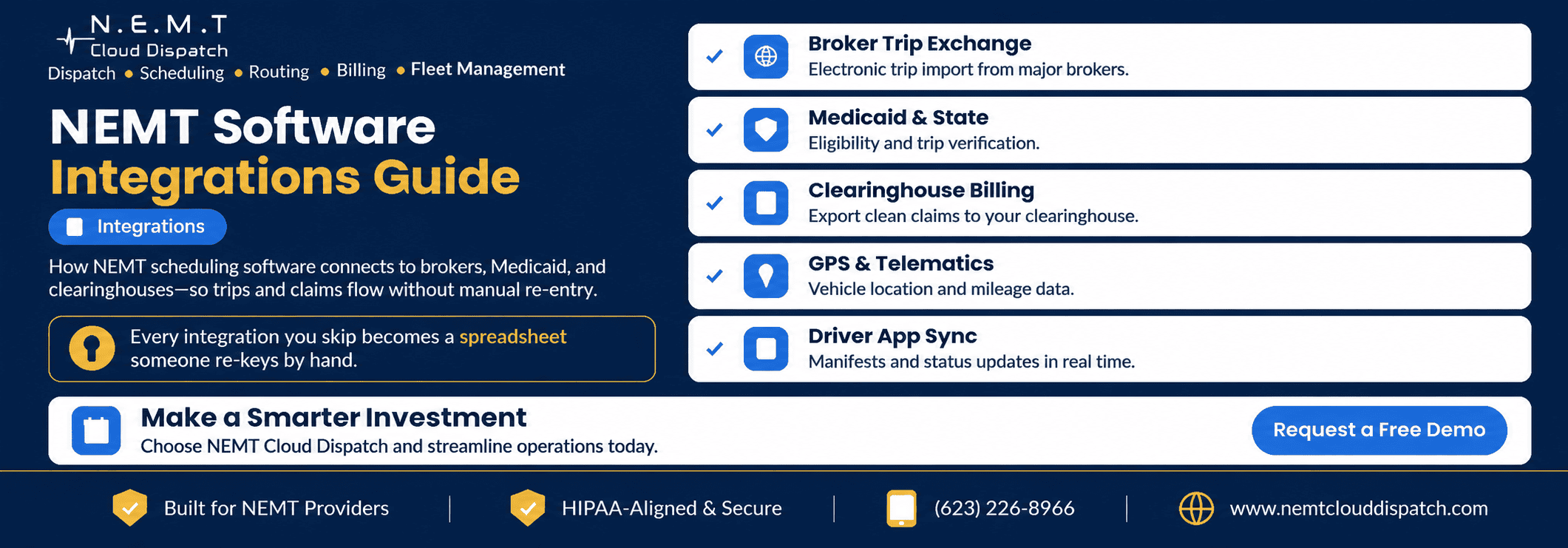
The fastest way to judge whether NEMT scheduling software will actually reduce manual work is to look at what it connects to.
A platform can have excellent scheduling, routing, and reporting features, but if your team still has to copy broker trips from one portal, re-enter completed-trip information into billing, and manually reconcile driver updates, much of the administrative work remains.
Every disconnected system creates another handoff.
The strongest NEMT platforms connect the systems that already run your operation—broker networks, dispatch, drivers, billing, accounting, and vehicle data—so information can move through the trip lifecycle without unnecessary re-entry.
This guide explains which NEMT software integrations matter most in 2026, what each connection should actually do, and how to verify integration depth before choosing a platform.
1. Broker Trip Exchange
For providers receiving trips through transportation brokers, broker connectivity can be one of the most valuable integrations in the entire system.
Instead of having dispatchers repeatedly log into broker portals and manually recreate trips, a direct NEMT broker integration may allow authorized trip information to move directly into the scheduling and dispatch workflow.
Depending on the broker and integration, imported information may include:
- Rider details
- Pickup address
- Destination
- Appointment time
- Pickup window
- Mobility requirements
- Service level
- Authorization information
- Trip notes
- Payer or plan information
The connection should ideally work in both directions where supported.
Trip information comes into the NEMT platform, while relevant status and completion information can flow back to the broker.
Those updates may include events such as:
- Trip accepted
- Driver assigned
- Driver en route
- Driver arrived
- Passenger picked up
- Passenger dropped off
- Trip completed
- No-show
- Cancellation
Why Broker Integrations Matter
Without a working integration, someone becomes the integration.
A dispatcher may receive a trip in the broker portal, type it into the scheduling platform, update the trip during the day, return to the broker portal to update its status, and then transfer information again for billing.
Every manual handoff adds time and creates another opportunity for mismatched:
- Addresses
- Appointment times
- Service levels
- Mileage
- Authorization numbers
- Trip statuses
A direct connection can reduce that duplicate work.
For additional detail on this workflow, see the guide to NEMT software with broker integrations.
How to Verify It
Do not ask only:
“Do you integrate with brokers?”
Ask:
“Show me exactly what happens with the brokers I use.”
Then verify:
- Does the trip import automatically?
- Which fields import?
- How frequently does data synchronize?
- Do broker changes update existing trips?
- Do cancellations synchronize?
- Which driver statuses push back?
- Does completed-trip information return to the broker?
- Does billing data flow through the same integration?
- Are there additional integration fees?
Most importantly, confirm the specific broker your company works with.
“Broker integration available” and “direct integration with your broker” are not the same thing.
2. Medicaid and State-Specific Workflows
Medicaid NEMT requirements are not identical across every state.
Federal Medicaid policy establishes the transportation assurance, but individual states determine many of the operational details used to administer their programs.
The Medicaid Assurance of Transportation guidance provides federal information about NEMT requirements and state flexibility.
For software buyers, this means you should be careful with vague claims such as:
“The system handles Medicaid.”
The better question is:
“How does this system support the Medicaid transportation workflow in the states where I operate?”
Depending on the state, managed care organization, broker, and payer arrangement, your workflow may need to account for:
- Member eligibility information
- Trip authorization
- Prior approval
- Level of service
- Mileage
- Pickup and drop-off documentation
- Driver information
- Vehicle requirements
- Escort or attendant information
- No-show documentation
- State-specific reporting
- Payer-specific billing fields
Software should help preserve the required information throughout the trip rather than forcing staff to reconstruct it at billing time.
How to Verify It
Give the vendor the state or states where you operate and ask:
- Which Medicaid workflows do you currently support there?
- Is transportation managed through a broker?
- Which verification steps are automated?
- Which remain manual?
- What information is stored with the trip?
- Which state- or payer-specific reports are available?
- How are authorization numbers handled?
- Can required documentation be retrieved later?
Do not assume a workflow that works in Arizona, Texas, California, or another state will automatically operate the same way everywhere.
Verify your actual program requirements.
3. Clearinghouse, Claims, and Billing Integrations
The next major connection begins when the transportation service ends.
A completed trip contains much of the information that may be required for billing:
- Service date
- Rider information
- Payer
- Authorization
- Pickup and destination
- Service level
- Mileage
- Driver
- Pickup time
- Drop-off time
- Completion status
- Supporting trip documentation
That information should not need to be manually rebuilt from scratch.
An integrated NEMT billing and claims workflow can use information captured throughout scheduling, dispatch, and driver execution to prepare billing records.
Depending on the payer, provider, and billing arrangement, claims may be transmitted directly, through a broker-specific process, or with the assistance of a billing service or clearinghouse.
CMS explains that Electronic Data Interchange (EDI) is the automated exchange of formatted healthcare transaction data and that clearinghouses or billing services may assist providers with electronic transactions.
For professional healthcare claims, the 837P is a widely used electronic transaction format, while the CMS-1500 is used in applicable paper-claim workflows.
Your exact billing requirements, however, depend on the payer and program involved.
How to Verify It
During the demonstration, do not stop at the billing dashboard.
Ask the vendor to:
- Create a trip.
- Dispatch it.
- Complete it through the driver workflow.
- Capture the required trip information.
- Move that same trip into billing.
- Generate the appropriate billing record or export.
- Show what happens when required information is missing.
Then count the manual steps.
Ask specifically:
- Which claim formats are supported?
- Are broker-specific billing formats supported?
- Can incomplete trips be identified before billing?
- Is claim status tracked?
- How are rejected or denied records handled?
- Does the platform connect directly to a clearinghouse?
- If not, what export format is provided?
- Can billing data be exported to accounting software?
The goal is not necessarily to eliminate every billing action.
The goal is to avoid re-entering information that the software already collected during the trip.
4. Accounting Integrations
Transportation billing and company accounting are related, but they are not the same workflow.
Once invoices, payments, expenses, or receivables are created, many operators want relevant financial information to move into their accounting system.
A useful accounting connection may help transfer data to platforms such as QuickBooks, Sage, or another financial system used by the company.
NEMT Cloud Dispatch, for example, describes accounting exports as part of its NEMT invoicing and billing software workflow.
How to Verify It
Ask exactly what “accounting integration” means.
It may mean:
- Direct synchronization
- Invoice export
- Customer export
- Payment export
- General-ledger export
- CSV export
- API-based integration
These are very different levels of integration.
Ask the vendor to demonstrate the actual transfer rather than relying on an integration logo.
5. GPS, Fleet Tracking, and Telematics
Vehicle location data connects operations with what is physically happening on the road.
A connected NEMT fleet management system can help dispatchers monitor active vehicles and associate relevant location information with trips.
Depending on the platform, GPS may come from:
- The driver’s mobile device
- A dedicated GPS device
- Installed vehicle telematics
- A third-party fleet tracking system
No single approach is automatically best.
What matters is whether the information is usable inside the transportation workflow.
Dispatchers should not have to monitor one screen for GPS and another disconnected system for trips if the two can be connected.
What GPS Integration Should Help With
Useful operational applications include:
- Current vehicle location
- Nearest-driver decisions
- Route visibility
- Arrival confirmation
- Pickup and drop-off timestamps
- Trip progress
- Mileage records
- Dispatch reassignment
- Historical trip review
Vehicle data may also support fleet and asset tracking functions such as inspections, maintenance records, and vehicle status.
How to Verify It
Ask:
- Where does GPS data come from?
- Does the system require additional hardware?
- Are hardware costs included?
- How often does location update?
- Does GPS work through the driver app?
- Can dispatch see all active vehicles?
- Are timestamps attached to trip records?
- How is mileage calculated?
- Can historical locations be reviewed?
- What happens when the driver’s phone loses connectivity?
Most importantly, determine which values are informational and which are actually used for dispatch, reporting, or billing.
6. Driver App Synchronization
The NEMT driver app should not function like a separate application that happens to display today’s trips.
It should be an extension of the scheduling and dispatch system.
Information should flow out to the driver while status and documentation flow back.
Dispatch to Driver
The application may receive:
- Manifest
- Pickup information
- Destination
- Rider instructions
- Mobility requirements
- Route
- Schedule changes
- Dispatcher messages
Driver to Dispatch
The driver may send back:
- En-route status
- Arrival
- Passenger onboard
- Completion
- No-show
- Timestamps
- GPS information
- Mileage
- Signature
- Notes
- Inspection information
The faster those updates become visible to dispatch, the closer the back office gets to seeing the actual state of the operation.
How to Verify It
Have two screens visible during the demonstration:
Screen 1: Driver phone
Screen 2: Dispatcher dashboard
Then ask the driver to change a status.
Watch what happens.
Next:
- Reassign the driver’s trip.
- Change the pickup time.
- Add a dispatcher note.
- Complete the trip.
- Capture proof of service.
Confirm that the relevant information appears on the other side without someone manually refreshing or re-entering it.
This test reveals much more than a screenshot of the mobile application.
7. Scheduling and Dispatch Integration
This connection is so basic that buyers sometimes forget to test it.
Scheduling is primarily about what should happen.
Dispatch is about what is happening now.
Those systems should operate from the same trip record.
A connected NEMT dispatching system should allow dispatchers to work from trips already created by scheduling without rebuilding them in another module.
If a scheduled trip changes, dispatch should see the current version.
If dispatch reassigns a driver, the driver workflow should receive the update.
If the driver completes the trip, billing should receive the final trip record.
That chain is the essence of integration.
8. API, Webhooks, and Custom Integrations
Not every system your business uses will have a pre-built integration.
This becomes increasingly important as operations grow and introduce additional systems such as:
- CRM
- Accounting
- Payroll
- HR
- Facility portals
- Hospital systems
- Custom reporting tools
- Data warehouses
- Business intelligence platforms
- Fleet systems
An API can allow authorized systems to exchange data according to defined rules.
Webhooks can allow one platform to notify another platform when a particular event occurs.
Potential integration events might include:
- Trip created
- Trip updated
- Trip canceled
- Driver assigned
- Driver arrived
- Passenger picked up
- Trip completed
- No-show recorded
- Billing record created
However, the phrase “open API” by itself tells you very little.
How to Verify It
If API or webhook access matters to your organization, request:
- API documentation
- Available endpoints
- Supported fields
- Authentication method
- Read/write permissions
- Rate limits
- Webhook availability
- Supported webhook events
- Error-handling documentation
- Sandbox access
- Versioning policy
- Technical support
- Pricing
- Implementation requirements
Also distinguish between:
Direct existing integration: already built and supported.
Custom integration: vendor can develop it for you.
Public API: your development team or approved partner can build against documented interfaces.
These are not interchangeable.
If an unusual connection is critical to your operation, get its scope, cost, responsibility, and implementation expectations in writing before signing.
The Integration That Matters Most: One Source of Truth
Every integration above has the same ultimate purpose:
Keep one reliable version of the trip.
A connected NEMT software platform should allow the trip to move through the operation without creating a new disconnected copy at every stage.
Consider a broker trip.
In a Connected Workflow
The broker sends the trip.
↓
The scheduling system receives it.
↓
Dispatch assigns the trip.
↓
The driver’s app receives the assignment.
↓
The driver records service events.
↓
Dispatch sees the updates.
↓
The completed record moves into billing.
↓
Required status or billing data returns through the appropriate integration.
The same trip moves through the workflow.
In a Disconnected Workflow
Broker portal
↓
Dispatcher copies trip into spreadsheet
↓
Dispatcher enters trip into scheduling system
↓
Driver receives information by text or phone
↓
Driver submits paper or separate digital record
↓
Office staff enters completion information
↓
Billing staff re-enters claim data
↓
Someone updates the broker portal
In this environment, your employees become the integration layer.
The problem is not simply that manual work takes longer.
It is that every duplicate copy can become inconsistent with the others.
A pickup time changes in one place but not another.
An authorization is mistyped.
Mileage differs.
The dispatcher has one trip status while billing has another.
That is why connectivity matters as much as the individual features.
How to Evaluate Integrations Before You Buy
Before talking to software vendors, map your current technology stack.
Create a simple list of every system your staff touches during the trip lifecycle.
For example:
Trip Sources
- Brokers
- Facilities
- Hospitals
- Direct customers
- Recurring private-pay customers
Operations
- Scheduling system
- Dispatch system
- GPS
- Driver app
- Phone/SMS
- Fleet management
Billing
- Broker portals
- Clearinghouse
- Billing company
- Claims software
- Accounting software
Now identify where staff currently copy information manually.
Those handoffs are your highest-priority integration opportunities.
Build an Integration Scorecard
For each connection, score the vendor on four questions:
1. Does the Integration Exist?
Yes, no, or custom development required?
2. Is It One-Way or Two-Way?
Does data only import, or can relevant information also flow back?
3. How Much Data Moves?
Does the integration carry only basic trip details, or does it also include statuses, authorizations, billing fields, modifications, and cancellations?
4. What Still Requires Manual Work?
This is the most important question.
An integration can technically exist while still leaving several manual steps.
Do not grade vendors on logos.
Grade them on workflow.
Prioritize Integrations by Volume and Financial Impact
You probably do not need every possible integration on day one.
Start with systems attached to the greatest amount of work.
If 60% of your trips come from one broker, that broker connection deserves more attention than an accounting integration used once a week.
If claim preparation consumes dozens of staff hours each month, dispatch-to-billing connectivity may deserve greater priority than advanced analytics.
A practical priority order is often:
- High-volume broker trip sources
- Scheduling and dispatch
- Driver app
- Billing and claims
- GPS/fleet data
- Accounting
- Secondary back-office systems
Your exact order will depend on your operation.
Test Integrations With Real Workflows
A canned demonstration can show that an integration exists.
It cannot prove that the integration fits your business.
Ask the vendor to test realistic examples.
Use:
- A broker trip
- A recurring dialysis trip
- A wheelchair trip
- A same-day change
- A cancellation
- A no-show
- A driver reassignment
- A completed trip moving into billing
For broker integrations, use the actual brokers your company works with whenever feasible.
For billing, use the type of claim or export your operation actually submits.
For driver workflows, let a driver test the mobile application.
The more closely the demonstration resembles your real operation, the easier it becomes to identify missing connections before you sign a contract.
Frequently Asked Questions
What Should NEMT Scheduling Software Integrate With?
The most important integrations generally connect the systems responsible for trip intake, scheduling, dispatch, driver execution, vehicle location, billing, and reporting.
Depending on your operation, that may include transportation brokers, state or payer workflows, a driver mobile app, GPS or telematics, billing systems, clearinghouses, accounting software, and other back-office platforms.
Why Do Broker Integrations Matter?
Broker integrations can reduce the need for dispatchers to manually recreate broker trips inside their scheduling system.
Deeper integrations may also exchange trip changes, statuses, completion information, and billing-related data.
The exact capabilities depend on the broker and software vendor, so providers should verify each connection individually.
Is NEMT Billing Usually Built In or Integrated?
Both approaches exist.
Some platforms provide billing and claims functionality inside the same system.
Others export completed-trip information to a billing platform, clearinghouse, broker system, or billing partner.
Either model can work well when information moves cleanly and the staff does not have to repeatedly re-key trip data.
Do I Need an API?
Not every NEMT provider needs API access.
A smaller operation using a relatively simple technology stack may be well served by built-in integrations.
API or webhook capabilities become more important when an organization needs to connect specialized accounting, HR, CRM, hospital, fleet, reporting, or internally developed systems.
If API access is a requirement, verify the available documentation and functionality before purchase rather than assuming it is included.
How Do I Verify an Integration Before Buying?
Ask the vendor to demonstrate your specific workflow.
Confirm:
- What data enters the platform
- What data leaves it
- How frequently synchronization occurs
- How changes and cancellations are handled
- What happens when the integration fails
- Which steps remain manual
- Whether there are additional fees
Then request confirmation of business-critical integrations in writing.
The Bottom Line
Integrations are where NEMT scheduling software either removes administrative work or simply moves that work somewhere else.
Start by mapping the systems your team uses today.
Then prioritize the connections that affect the highest number of trips and the most important revenue workflows:
- Broker trip exchange
- Medicaid and payer-specific workflows
- Scheduling and dispatch
- Driver app synchronization
- GPS and fleet data
- Billing and claims
- Accounting
- APIs and custom integrations
Above all, look for one connected trip record.
The goal is for information to enter the system once, remain current as the trip changes, follow the driver through service, and reach billing and reporting without unnecessary duplicate entry.
Every well-designed integration removes a handoff.
Every missing integration leaves someone on your team doing that handoff manually.
Want to test your actual broker and billing workflow?
Review the current NEMT Cloud Dispatch broker integrations, compare NEMT software pricing, or schedule a live demo using the brokers and workflows your operation relies on.
Or call (623) 226-8966