Every NEMT dispatching vendor gives you a long feature list. In a demo, most of those features start to blur together.
The real risk is buying software because the checklist looks impressive instead of choosing the handful of tools your dispatchers, drivers, and billing team will use every day.
This guide cuts through the noise and focuses on the NEMT dispatching software features that actually improve on-time performance, reduce no-shows, protect revenue, and help your operation run with less manual work. Comparing platforms? Use this guide to evaluate dispatch functionality. For product details, visit our NEMT Dispatching Software page. For cloud vs. legacy systems, see our Cloud-Based NEMT Dispatch Software vs. Legacy Systems guide.
Features That Matter Every Single Day
Dispatchers live inside a few core tools during every shift. If those tools are slow, confusing, or unreliable, the rest of the platform will not save the operation.
Drag-and-Drop Dispatch Board
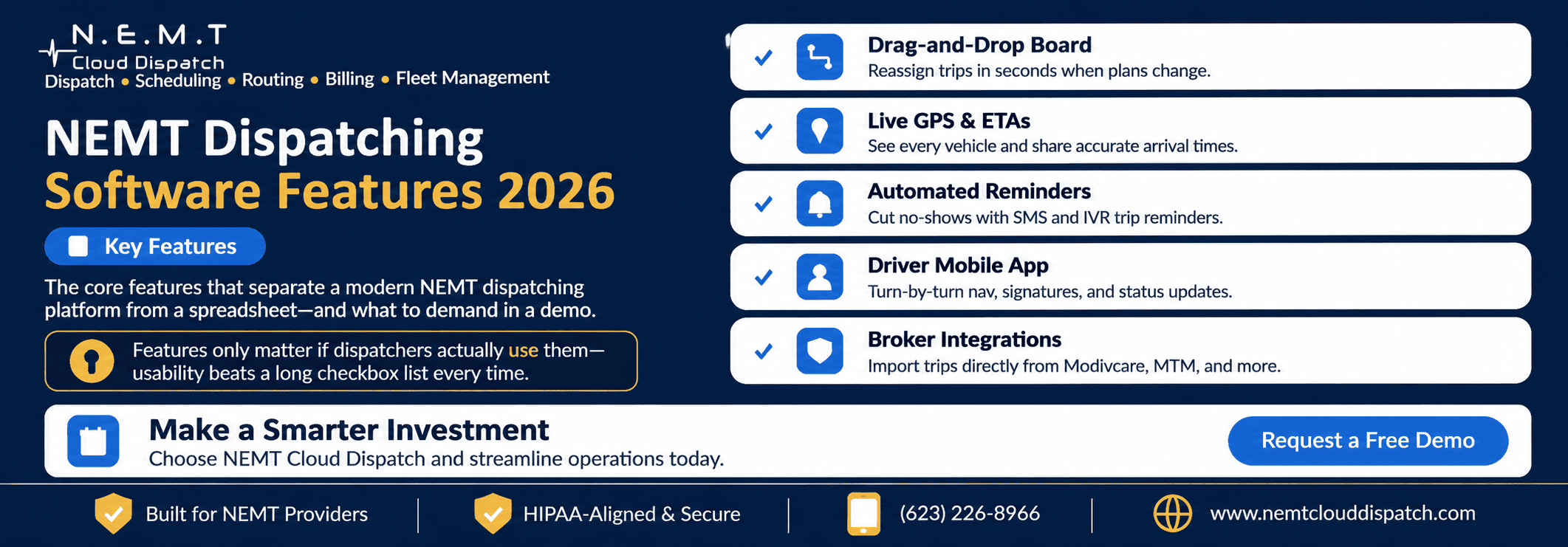
A strong dispatch board should let your team reassign trips quickly when a driver runs late, a rider cancels, a same-day trip comes in, or a vehicle becomes unavailable.
Dispatchers should not have to open five screens to move one ride. The board should make active trips, assigned drivers, trip statuses, cancellations, no-shows, and exceptions easy to see in one place.
Smart Trip Assignment
Smart trip assignment helps dispatchers choose the best driver or vehicle based on location, availability, mobility type, capacity, appointment time, and trip requirements.
The software should suggest the closest practical vehicle, but still allow a dispatcher to override the recommendation when real-world judgment matters. This is especially important for wheelchair trips, escorts, two-person teams, recurring rides, and facility pickups.
Live GPS and Accurate ETAs
Live GPS visibility helps dispatchers answer the question every facility asks: “Where is the driver?”
A good system should show vehicle location, route progress, and realistic arrival times. When GPS and ETA information are reliable, dispatchers can update riders, facilities, and brokers with confidence instead of calling drivers repeatedly.
For operations trying to reduce delays, a connected NEMT routing software system can also help reduce unnecessary miles, improve route planning, and keep vehicles moving efficiently.
Automated SMS and IVR Reminders
Manual reminder calls take time and still leave room for missed communication. Automated reminders help reduce no-shows by sending riders trip confirmations, appointment reminders, ETA alerts, cancellation notices, and trip updates.
A built-in NEMT SMS service can save dispatcher time while keeping riders informed before and during the trip.
Will-Call Queue
Will-call trips can become chaotic if they are tracked through sticky notes, texts, or memory. A proper will-call queue gives dispatchers a structured way to capture return trips, prioritize riders, assign the right vehicle, and avoid leaving passengers waiting after appointments.
This matters most for dialysis centers, hospitals, outpatient procedures, and facilities where return times are unpredictable.
The Driver App Is Half the Platform
Dispatching quality depends on what happens inside the vehicle. A strong NEMT driver app should give drivers everything they need to complete trips accurately without constant phone calls from dispatch.
At minimum, the driver app should include:
- Daily trip manifest
- Pickup and drop-off details
- Rider mobility notes
- Turn-by-turn navigation
- One-tap trip status updates
- Driver-dispatch communication
- Proof of pickup and drop-off
- Digital signature or photo capture
- Offline support for weak network areas
- Pre-trip and post-trip inspection options
When the driver app is weak, dispatchers end up calling drivers for every status update. That slows the board, creates incomplete trip records, and can lead to billing problems later.
During a demo, test the driver app on a real phone. Do not only watch the dispatcher screen. Run one trip from assignment to completion and confirm how easy it is for the driver to navigate, update status, capture proof of service, and communicate with dispatch.
Features That Protect Your Revenue
Some features do not touch the daily dispatch board, but they decide whether completed rides become clean, defensible, billable trips.
Broker Trip Import
If your team works with brokers, manual trip entry can waste hours and create errors. A strong platform should support direct NEMT broker integrations so broker trips can import into the system instead of being rekeyed from portals.
This is especially important for providers working with brokers such as Modivcare, MTM, Kaiser Permanente, VectorCare, Access2Care, Alivi, and HBSS Connect Corp.
Digital Proof of Service
Digital proof of service helps protect your operation when a broker, payer, facility, or rider questions a trip.
Look for timestamps, GPS-based pickup and drop-off records, driver status history, signatures, mileage, and notes attached to the trip record. The goal is simple: when someone asks what happened, your team should be able to pull the evidence quickly.
Billing Hooks
Dispatching software should not stop when the trip is completed. Completed trips should flow into billing with the right trip data, mileage, authorization numbers, payer details, and service information.
A connected NEMT invoicing and billing software workflow helps reduce missed claims, duplicate entry, billing errors, and delayed payment.
Standing Orders
Recurring dialysis, therapy, adult day care, and routine appointment trips should not be recreated manually every week.
Standing order support allows dispatchers to build recurring trips once and manage changes as needed. This saves time, improves schedule accuracy, and reduces the chance of missed recurring rides. For recurring trip planning, review how NEMT scheduling software supports future rides, repeat appointments, and same-day changes.
Audit-Ready Trip Logs
When a broker or payer asks for trip evidence, your team should not have to search through texts, call logs, spreadsheets, and paper notes.
Audit-ready trip logs should make it easy to retrieve status history, driver updates, timestamps, proof of service, billing details, and trip notes from one record.
Reporting You Will Actually Use
The best report is the one you check every morning.
A useful dashboard should show the numbers that affect daily operations and profit, including:
- On-time performance
- Completed trips
- Cancellations
- No-show rate
- Vehicle utilization
- Driver productivity
- Dead miles
- Late pickups
- Revenue by payer or broker
- Trips ready for billing
A 40-tab export is not helpful if the owner or dispatcher cannot spot a problem quickly. Reporting should make it obvious when on-time performance is slipping, a driver is overloaded, a vehicle is underused, or a payer is creating billing delays.
Reporting should provide easy access to records needed by brokers, payers, auditors, and compliance teams. Confirm that the platform retains trip history, timestamps, driver activity, proof of service, notes, and other required documentation. Requirements vary by payer, broker, contract, and jurisdiction.
For providers managing multiple vehicles, connected NEMT fleet management software can also help monitor vehicles, maintenance, compliance alerts, driver behavior, and asset usage.
Usability Beats Feature Count
The longest feature list does not always mean the best software.
A platform your dispatchers can use smoothly during a busy morning will beat a more “advanced” system that slows everyone down. The most important actions should be fast:
- Assign a trip
- Reassign a trip
- Find a driver
- Update a trip status
- Handle a cancellation
- Dispatch a will-call return
- Pull proof of service
- Move a completed trip into billing
In the demo, count the clicks. If it takes too many steps to complete common actions, your team will feel that friction every day.
Also treat support quality as a feature. NEMT operations run in real time. When the dispatch board is active and something breaks, fast support matters more than an extra module nobody uses.
Before choosing a tier or package, compare the features you need with the vendor’s pricing. NEMT Cloud Dispatch publishes transparent NEMT software pricing so providers can see what is included before they book a demo.
Cloud Access, Scalability, and Data Security
Cloud-based NEMT dispatch platforms can help transportation providers manage daily operations across dispatch offices, remote teams, and multiple service locations. However, cloud accessibility alone does not guarantee that a platform will fit every operation.
When evaluating a dispatch system, consider three practical requirements:
Access Across Dispatch Locations
Confirm whether authorized dispatchers can securely access trip assignments, vehicle availability, driver status updates, and operational reports from different locations. Ask how user permissions are managed and what happens when internet connectivity is interrupted.
Room for Operational Growth
As trip volume, fleet size, or service coverage increases, dispatchers need a system that can support additional users, vehicles, and workflows without unnecessary manual work. During a demo, ask the vendor to demonstrate how the platform handles higher trip volumes, multiple dispatchers, and changes in operating capacity.
Data Security and Access Controls
NEMT providers handle sensitive rider and transportation information. Review user permissions, authentication options, data protection practices, backup procedures, and applicable contractual requirements before adopting a platform.
Cloud hosting does not automatically establish HIPAA compliance or guarantee protection against unauthorized access. Security capabilities and compliance responsibilities should be evaluated against the provider’s actual operating requirements.
Quick-Reference Summary: How to Test NEMT Dispatching Features in a Demo
- Bring real trips. Give the vendor a sample of your actual trips, including a wheelchair ride, a standing order, and a same-day change.
- Time the core actions. Count the clicks needed to assign a trip, reassign it, cancel it, and retrieve proof of service.
- Test the driver app on a phone. Run a trip from the driver’s side, including navigation, status updates, and signature capture.
- Trigger a real-world change. Cancel a trip mid-route or mark a driver late and watch how quickly the dispatch board updates.
- Check the morning dashboard. Confirm on-time performance, no-shows, utilization, late pickups, and billing-ready trips are visible at a glance.
- Ask about support. Confirm how quickly the vendor responds when dispatch, billing, or driver app issues happen during live operations.
- Evaluate cloud access and security. Ask the vendor to demonstrate role-based user access, multiple-dispatcher workflows, service continuity during connection problems, and the security controls relevant to your operation.
Frequently Asked Questions
What features matter most in NEMT dispatching software?
The most important features are the tools your team uses every day: a fast dispatch board, smart trip assignment, live GPS, accurate ETAs, automated rider reminders, will-call management, a reliable driver app, proof of service, broker imports, billing workflows, and useful reporting.
Why is the driver app so important?
The driver app captures what happens in the vehicle. It gives drivers trip details, navigation, rider notes, status update tools, and proof of pickup or drop-off. A weak driver app forces dispatchers to call for updates and can leave billing teams without complete proof of service.
How do I evaluate NEMT dispatching features in a demo?
Use your own trips. Time how long it takes to assign, reassign, cancel, complete, and retrieve proof of service. Test the driver app on a real phone and ask the vendor to show how the system handles a late driver, a will-call return, and a billing-ready completed trip.
Do more features mean a better NEMT platform?
Not always. Usability, reliability, support, and workflow fit usually matter more than feature count. A system your dispatchers can use quickly during peak hours is more valuable than a long checklist of features your team rarely opens.
Should NEMT software include broker integrations?
Yes, especially if your business depends on broker trips. Broker integrations reduce manual entry, help keep trip data cleaner, support status updates, and make billing easier. Ask which brokers are directly supported and whether extra integration fees apply.
Ready to See These Features in Action?
The best way to compare NEMT dispatching software is to test it with your real trips, real driver workflow, and real billing requirements.
You can book a live demo with NEMT Cloud Dispatch to see how dispatching, routing, driver app, broker integrations, SMS reminders, billing, and reporting work together in one platform.