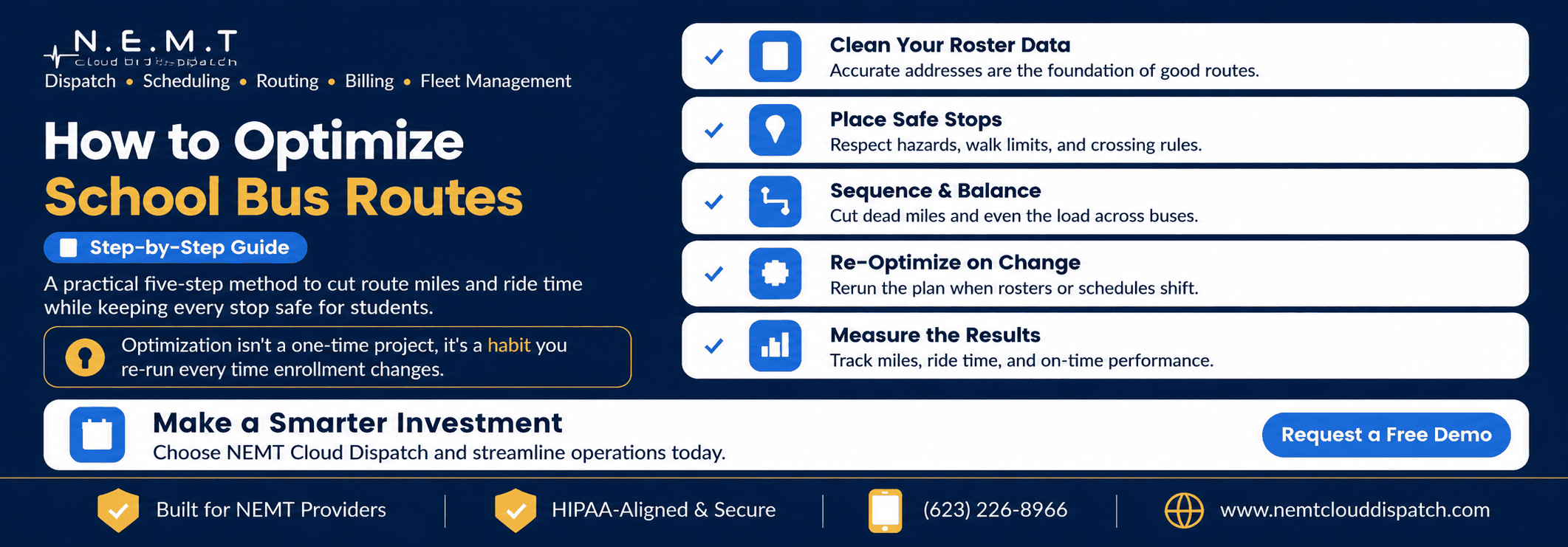
Optimizing school routes is not a once-a-year project that districts complete and forget. It is a repeatable process that should be run whenever enrollment, student addresses, bell times, vehicle availability, or transportation requirements change.
Done well, route optimization reduces unnecessary mileage and student ride times, balances passenger loads, improves fleet utilization, and keeps every stop safe.
Modern school transportation software gives districts a structured way to clean transportation data, place safer stops, optimize route sequences, respond to changes, and measure results.
Here is a five-step method districts can follow—and repeat throughout the school year.
Step 1: Clean Your Roster Data First
Optimization is only as accurate as the data behind it.
Before modifying a single stop or route, verify that every student record contains accurate information, including:
- Home address
- School assignment
- Grade level
- Transportation eligibility
- Program information
- Pickup and drop-off requirements
- Accessibility needs
- Assigned guardian contacts
- Effective enrollment dates
Every address should geocode to the correct location. Apartment numbers, directional street names, ZIP codes, rural roads, duplicate addresses, and recently constructed neighborhoods should be reviewed carefully.
A small number of incorrect addresses can place stops on the wrong street, create unnecessary mileage, assign students to the wrong route, or produce unrealistic pickup times.
Districts should also identify students who have:
- Separate morning and afternoon addresses
- Shared custody transportation arrangements
- Temporary transportation requirements
- Out-of-district school placements
- Door-to-door pickup requirements
- Wheelchair, aide, harness, or other IEP accommodations
These requirements should be stored as structured information rather than informal notes. An integrated special-needs school transportation system can help ensure that door-to-door service, accessible vehicles, aides, and other transportation accommodations function as route constraints.
Because student addresses and transportation requirements may be sensitive education records, districts should also control who can access, export, and edit them. Review the U.S. Department of Education’s FERPA requirements and guidance alongside applicable district and state privacy policies.
Data cleaning may not be the most visible part of optimization, but it is the foundation for every step that follows.
Step 2: Place Safe, Sensible Stops
Once the roster is accurate, group students into stops that are both practical and safe.
Well-designed stops should consider:
- Maximum student walking distances
- Road speed and traffic volume
- Safe waiting areas
- Sidewalk availability
- Lighting and visibility
- Road crossings
- Railroad crossings
- Vehicle turnaround requirements
- Weather and seasonal conditions
- Student age
- Accessibility requirements
- Local and state transportation policies
The objective is not simply to create the fewest possible stops. It is to create the most efficient stop plan within clearly defined safety boundaries.
A consolidated stop may reduce mileage, but it should not require a student to cross a dangerous road, wait in an area with poor visibility, or walk farther than district policy allows.
The National Highway Traffic Safety Administration’s school bus route and stop planning guidance provides useful considerations for evaluating student access, waiting areas, road crossings, routing to stops, planning procedures, and information exchange.
Routing software should allow the district to define rules such as:
- Maximum walking distance by grade
- No-cross zones
- Prohibited roads or intersections
- Minimum turnaround space
- Approved stop locations
- Door-to-door transportation requirements
- Maximum students per stop
- Required loading-side placement
When these rules are stored in the system, they become part of the route-building process instead of relying on staff members to remember every exception.
For districts coordinating several schools, a centralized school district transportation portal can help administrators review stops and transportation requirements across the district while giving each school access to its relevant students.
Step 3: Sequence and Balance the Runs
After stops are placed, the next step is deciding the order in which each bus should serve them.
Effective school bus route optimization software should evaluate different stop sequences and student groupings while respecting operational constraints.
The system should account for:
- School bell times
- Vehicle capacity
- Maximum student ride time
- Route start and end locations
- Driver shift availability
- Special equipment
- Student transportation restrictions
- Traffic conditions
- Loading and unloading time
- Travel between route tiers
The goal is to reduce deadhead mileage and total travel time while distributing students appropriately across the available fleet.
Without balancing, one bus may operate at capacity while another nearby route remains half empty. A better route arrangement may combine or divide runs so that the same students can be transported with fewer miles, fewer driver hours, or fewer vehicles.
Routing software can test many possible stop sequences and load combinations far faster than a transportation team working manually with maps and spreadsheets.
However, the shortest mathematical route is not always the best operational route. The selected plan must also be:
- Safe
- Understandable for drivers
- Realistic during normal traffic
- Compatible with bell times
- Appropriate for student needs
- Reliable enough to operate every day
Before publishing the optimized plan, compare it with current routes and review any significant changes manually.
Step 4: Re-Optimize Whenever Conditions Change
A route plan begins to drift as soon as district conditions change.
During the school year, students may:
- Enroll or withdraw
- Move to new addresses
- Transfer between schools
- Change programs
- Receive new transportation accommodations
- Begin using a different morning or afternoon address
Districts may also change bell times, add classrooms, open schools, close roads, replace vehicles, or lose drivers.
The most efficient districts do not continually patch the original route by hand. They re-run the optimization process when meaningful changes occur.
For a single new student, the system may identify the best existing stop or route. For a larger change, it may need to re-sequence several routes or redistribute students across vehicles.
A connected transportation dispatch platform also helps districts manage short-term operational changes such as:
- Driver call-outs
- Vehicle breakdowns
- Road closures
- Temporary stop changes
- Delayed routes
- Emergency reassignments
Updated routes should flow directly to the people responsible for operating them. A connected driver application can provide revised manifests, stop details, navigation, pickup instructions, and dispatch communication without relying on printed route sheets.
Families may also need updated pickup times or delay notifications. A parent app for school bus tracking can help distribute transportation updates and reduce routine status calls to the district office.
Re-optimization should be treated as a normal operating practice—not an emergency project performed only when routes have become unmanageable.
Step 5: Measure the Results
Optimization is not complete when new routes are published.
Districts should track the results and compare them with the previous plan. Without a baseline and measurable outcomes, the transportation team cannot determine whether the changes produced a genuine improvement.
Useful performance indicators include:
- Total daily route mileage
- Deadhead mileage
- Average student ride time
- Maximum student ride time
- Number of buses required
- Vehicle capacity utilization
- Driver hours
- Overtime hours
- Fuel consumption
- On-time arrival rate
- Missed or delayed pickups
- Number of manual route adjustments
Measure these indicators before optimization and again after the revised routes have operated long enough to produce reliable results.
Mileage alone should not determine whether a route is successful. A plan that saves miles but increases late arrivals, creates unsafe stops, or produces excessive student ride times is not an improvement.
Districts should evaluate efficiency, safety, service quality, and operational reliability together.
Measurement turns route optimization from a one-time cleanup into a continuous discipline that can support transportation budgets, fleet planning, staffing decisions, and school board reporting.
Common Route Optimization Mistakes to Avoid
Several recurring mistakes prevent districts from receiving the full benefit of routing software.
Optimizing Once and Never Repeating It
A clean September route plan can gradually become inefficient as students enroll, withdraw, move, and change programs.
Set clear triggers for re-optimization, such as:
- A defined number of roster changes
- A new school or program
- A bell-time adjustment
- A consistent capacity problem
- Repeated late arrivals
- An increase in route mileage
- A major driver or vehicle change
Chasing Mileage at the Expense of Safety
Reducing route mileage is important, but it should never override stop safety, student accessibility, walking-distance rules, or required transportation accommodations.
Safety constraints should be defined before the optimization engine begins comparing routes.
Ignoring Real Operating Conditions
A route may look efficient on a map but fail because it does not include realistic loading time, traffic, railroad crossings, vehicle turnaround time, or travel between schools.
Test new routes under normal operating conditions before treating projected savings as final.
Measuring Nothing After Launch
Without before-and-after measurements, staff cannot tell whether the new routes actually reduced mileage, improved ride times, or lowered the number of buses required.
Record the baseline before making changes and use the same metrics after implementation.
Patching Routes Manually for Too Long
Adding one student manually may appear faster than re-running the plan. Repeated manual changes, however, gradually create inefficient and unbalanced routes.
Review the complete route structure regularly instead of allowing temporary adjustments to become permanent by default.
How Routing, Scheduling, and Dispatch Work Together
Route optimization determines which students and stops should be grouped together and the order in which they should be served.
Scheduling then assigns those routes to vehicles, drivers, and bell-time tiers.
Dispatch manages the live operation when the published plan encounters driver absences, traffic delays, vehicle problems, and last-minute transportation changes.
When routing, scheduling, dispatch, driver communication, and district data operate within one platform, roster changes can move through the complete workflow without staff repeatedly entering the same information.
That connected process helps maintain an accurate plan from the district transportation office to the driver and the family.
Evaluate Route Optimization Using Your District’s Data
A software demonstration should use the district’s actual routing constraints rather than a generic sample.
Provide the vendor with:
- Student addresses
- Existing stops and routes
- School bell times
- Vehicle capacities
- Driver availability
- Maximum ride-time policies
- Maximum walking distances
- Hazard restrictions
- Special transportation requirements
- Current mileage and bus count
Ask the vendor to optimize the district’s existing plan and show the before-and-after difference in mileage, ride times, capacity utilization, driver hours, and buses required.
You can schedule a school transportation software demo to evaluate how NEMT Cloud Dispatch would handle your district’s students, stops, routes, drivers, vehicles, and daily transportation changes.
Quick-Reference Summary
How to Optimize School Bus Routes in Five Steps
Step 1: Clean Your Roster Data
Verify that student addresses geocode correctly and that school, grade, program, eligibility, and transportation-requirement information is accurate.
Step 2: Place Safe Stops
Group students into sensible stops that respect road hazards, walking-distance policies, crossing restrictions, accessibility requirements, and local safety rules.
Step 3: Sequence and Balance Routes
Optimize stop order, reduce deadhead mileage, respect vehicle capacity, and distribute students efficiently across the available buses.
Step 4: Re-Optimize When Conditions Change
Re-run the plan when students enroll, withdraw, move, change programs, or when schools adjust bell times and transportation requirements.
Step 5: Measure the Results
Compare route miles, ride times, bus requirements, vehicle utilization, driver hours, and on-time performance with the previous baseline.
Frequently Asked Questions
What Is the First Step in Optimizing School Bus Routes?
The first step is cleaning the student roster data. Verify that addresses geocode to the correct locations and that school assignments, programs, grades, eligibility, and transportation requirements are accurate before building or changing routes.
How Much Can School Bus Route Optimization Save?
Savings vary according to the district’s current routes, geography, enrollment, bell times, fleet size, and operating rules. Effective optimization can reduce unnecessary mileage and ride times, improve vehicle utilization, and potentially allow the same students to be transported using fewer buses or driver hours.
Districts should measure their own before-and-after results rather than relying on a general savings percentage.
How Often Should Districts Re-Optimize Routes?
Districts should re-optimize whenever meaningful changes occur in enrollment, addresses, programs, bell times, vehicle availability, or transportation requirements. They should also schedule periodic reviews so that small manual changes do not accumulate into inefficient routes.
Can Route Optimization Software Automatically Place Bus Stops?
Software can recommend stop locations based on student addresses, walking limits, capacity, road restrictions, and district-defined rules. Transportation staff should still review recommended stops for local safety conditions and operational practicality before publishing them.
What Metrics Should Districts Track After Optimization?
Districts should track total route mileage, deadhead mileage, average and maximum student ride times, number of buses required, capacity utilization, driver hours, overtime, and on-time performance. Safety incidents and parent or driver feedback should also be reviewed.