“How much is it?” is usually one of the first questions providers ask when evaluating NEMT scheduling software—and it can also be one of the most frustrating questions to answer.
The sticker price rarely tells the whole story.
Two platforms with similar monthly rates can have very different total costs once you factor in trip volume, vehicle limits, implementation, broker integrations, driver access, billing capabilities, support, and other add-ons.
For providers serving Medicaid populations, technology also sits inside a broader transportation and documentation workflow. The Centers for Medicare & Medicaid Services (CMS) provides federal resources explaining the role and requirements surrounding non-emergency medical transportation.
This guide breaks down how NEMT software pricing works in 2026 and shows you how to compare vendors using a number that is often more useful than the headline subscription price: cost per completed trip.
The Three Main NEMT Software Pricing Models
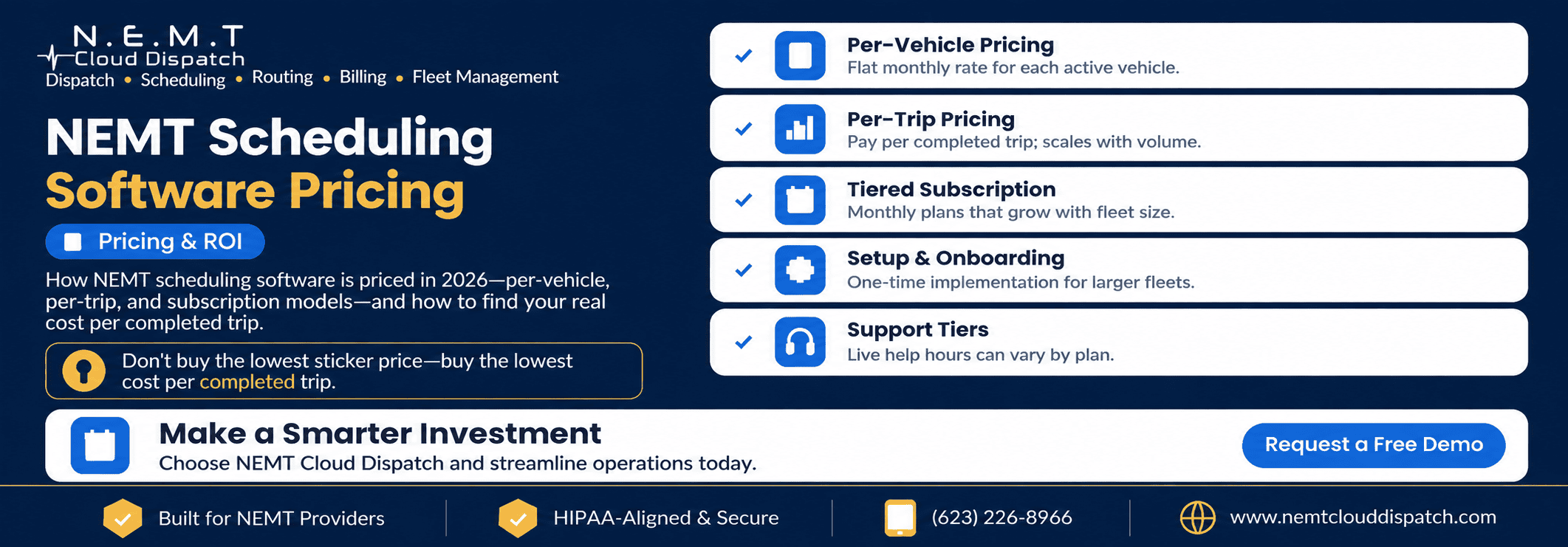
Most NEMT scheduling platforms use one of three primary pricing approaches, although some vendors may combine these models or add separate user, integration, or transaction fees.
1. Per-Vehicle Pricing
With per-vehicle pricing, you pay a fixed monthly amount based on the number of active vehicles in your fleet.
This model can make budgeting straightforward because software costs scale with fleet capacity rather than the number of trips completed.
It can work particularly well for higher-volume operations because completing additional trips does not automatically increase the software bill when the provider remains within the same vehicle allowance.
The downside is that providers should understand how inactive, backup, seasonal, or temporarily out-of-service vehicles are counted.
Questions to ask include:
- Does every registered vehicle count?
- Can inactive vehicles be paused?
- Are backup vehicles charged at the full rate?
- Does adding one vehicle trigger a new pricing tier?
Providers comparing this model can review NEMT Cloud Dispatch’s current NEMT software pricing to see an example of published vehicle-capacity pricing.
2. Per-Trip Pricing
Under a per-trip model, the provider pays a fee for each completed trip processed through the software.
This can be attractive for new businesses, low-volume operations, or companies with significant seasonal fluctuations because software expenses rise and fall with transportation volume.
The important number is not the individual trip fee—it is what that fee becomes at your actual monthly volume.
For example:
Monthly software cost = completed monthly trips × per-trip software fee
A seemingly small transaction charge can become a significant monthly expense when multiplied across thousands of trips.
Before choosing this model, ask whether there are:
- Monthly minimums
- Volume commitments
- Different rates at higher volumes
- Charges for canceled trips
- Charges for no-shows
- Transaction or payment-processing fees
3. Tiered Subscription Pricing
A tiered subscription uses a fixed monthly price tied to a defined range, such as fleet size, trip volume, number of users, or available features.
For example, one tier might support a small fleet while the next tier supports a larger number of vehicles.
This model can make costs predictable, but providers should understand exactly what causes the account to move into the next tier.
Ask whether tiers are based on:
- Vehicles
- Drivers
- Dispatchers
- Monthly trips
- Locations
- Features
- Broker connections
A provider adding only one vehicle or exceeding a trip allowance by a small amount could potentially move into a higher pricing band, depending on the vendor’s structure.
Which Pricing Model Is Best?
There is no pricing model that is automatically cheapest for every NEMT company.
A high-volume fleet may benefit from vehicle-based or flat subscription pricing because the software expense does not increase with every additional completed trip.
A very small or seasonal operator may find per-trip pricing easier to manage when transportation volume is limited.
If you operate fewer than 10 vehicles, this guide to NEMT software for small fleets provides additional factors to consider when balancing features and cost.
The right comparison requires using your own fleet size, trip volume, staffing structure, and payer mix.
What Actually Moves the Price?
The base pricing model is only the starting point.
Several factors can change the real first-year cost of an NEMT software platform.
Fleet Size and Trip Volume
Fleet size and trip volume are two of the most important variables.
Per-vehicle platforms become more expensive as vehicles are added, while per-trip systems become more expensive as completed ride volume increases.
Tiered systems can increase when you cross a predefined threshold.
Before requesting quotes, know approximately:
- How many vehicles you actively operate
- How many drivers you have
- How many trips you complete each month
- Whether trip volume changes significantly by season
- How quickly you expect the fleet to grow
These numbers make vendor comparisons much more meaningful.
Broker and Medicaid Integrations
If a significant percentage of your trips come through transportation brokers, integration capabilities can materially affect both software cost and staff workload.
Some vendors include integrations in the standard subscription, while others may charge separately for specific connections, custom interfaces, or higher integration tiers.
Before signing, review the platform’s NEMT broker integrations and confirm support for the brokers your operation actually uses.
Do not stop at asking whether a broker’s name appears on an integration list.
Ask what the integration actually handles:
- Trip imports
- Trip updates
- Cancellations
- Driver or vehicle status
- Authorization information
- Mileage
- Completed-trip data
- Billing information
The more manual work that remains outside the integration, the more labor cost you may still carry even after purchasing the software.
Billing and Claims Depth
Billing functionality can range from a basic completed-trip export to a much deeper claims workflow.
A connected NEMT billing and claims system may help staff identify missing documentation before submission and reduce duplicate data entry between dispatch and billing.
When applicable to a provider’s payer workflow, CMS also publishes information about professional electronic and paper claim formats such as the 837P and CMS-1500.
When evaluating billing functionality, determine whether the quoted price includes:
- Claim preparation
- Billing validation
- Electronic claim generation
- Broker-specific billing formats
- Invoice generation
- Denial management
- Payment reconciliation
- Accounting exports
- Reporting
A cheaper platform that requires extensive manual billing work may not have the lowest total operating cost.
Onboarding and Implementation
Implementation is another cost that is easy to overlook.
Depending on the vendor and complexity of your operation, implementation may involve:
- Data migration
- Driver and vehicle setup
- Recurring trip imports
- Broker configuration
- Billing configuration
- User training
- Workflow customization
- Historical trip migration
Ask whether onboarding is included or charged separately.
More importantly, request the total first-year cost, not simply the monthly subscription amount.
Support Level
Support can also change the effective price.
Some platforms include live support for all customers, while others reserve phone support, priority service, or dedicated onboarding contacts for higher-priced plans.
Ask specifically:
- What days is support available?
- What hours is live support available?
- Is phone support included?
- Is there an additional support plan?
- How are urgent dispatch issues handled?
- Is training included when new staff members are hired?
A dispatch system is operational software. Support becomes much more important when vehicles and passengers are already on the road.
Watch the Hidden Costs
The published subscription price is only one component of total cost.
Before comparing vendors, ask about:
- Setup fees
- Implementation fees
- Data migration fees
- Per-trip fees
- Per-user fees
- Driver app licenses
- Broker integration charges
- API access
- SMS or communication fees
- Payment-processing charges
- Overage rates
- Premium support
- Training fees
- Software customization
- Annual contract requirements
- Cancellation fees
Do not compare Vendor A’s base subscription against Vendor B’s all-inclusive price.
Create the same cost structure for every vendor.
A simple comparison might look like:
First-year cost = subscription + implementation + integrations + user fees + transaction fees + required add-ons
Then compare the total.
How to Calculate Real Software Cost Per Trip
One of the simplest ways to normalize pricing across different vendors is to calculate software cost per completed trip.
Use this formula:
Total monthly software cost ÷ completed trips per month = software cost per completed trip
Suppose a provider pays $500 per month for software and completes 2,000 trips.
$500 ÷ 2,000 = $0.25 per completed trip
A different platform might advertise a lower base subscription but become more expensive after transaction fees, integrations, or additional users are included.
You can also track software cost alongside other operational KPIs using a structured NEMT performance metrics process.
Cost per trip should not be the only metric you evaluate, but it creates a common denominator that makes different pricing models easier to compare.
Do Not Look at Software Cost in Isolation
The cheapest subscription is not automatically the cheapest system to operate.
Software can affect expenses elsewhere in the business, including:
- Dispatcher labor
- Administrative labor
- Driver utilization
- Empty or deadhead mileage
- Fuel consumption
- Overtime
- Billing rework
- Unbilled completed trips
- Claim corrections
- Vehicle utilization
This is why the better question is often:
What does this platform cost after considering the operational work it removes or reduces?
For example, scheduling and route optimization can be evaluated based on changes in vehicle miles, driver hours, trip density, and fleet utilization—not simply whether the platform contains an “optimization” feature.
The U.S. Department of Energy also provides a Vehicle Cost Calculator that can help transportation operators think through factors involved in vehicle operating costs.
A Better Way to Calculate ROI
Build your ROI case around measurable categories rather than broad promises.
1. Labor Saved
Estimate how much time staff currently spend on:
- Manual trip entry
- Route building
- Driver assignments
- Calling drivers
- Updating spreadsheets
- Broker portal entry
- Preparing invoices
- Fixing billing errors
Then calculate:
Hours saved per month × average loaded hourly labor cost = estimated monthly labor savings
2. Vehicle and Driver Utilization
Measure whether the platform helps your existing fleet complete more useful work without adding vehicles or unnecessary driver hours.
Useful metrics include:
- Completed trips per vehicle
- Completed trips per driver
- Revenue trips per vehicle hour
- Deadhead miles
- Empty vehicle time
3. Mileage Saved
Reducing unnecessary mileage can affect more than fuel.
Mileage also contributes to:
- Maintenance
- Tires
- Depreciation
- Vehicle replacement cycles
The Department of Energy notes that transportation efficiency can be improved through approaches including efficient routing and connected transportation technologies. Its transportation system efficiency resources provide additional context.
4. Billing and Revenue Capture
Look for measurable improvements such as:
- Fewer incomplete trip records
- Fewer trips waiting to be billed
- Less duplicate billing entry
- Faster documentation review
- Fewer avoidable submission errors
Do not assume a specific savings percentage before implementation.
Measure your baseline first, then compare performance after the software goes live.
About the “20 Minutes Per Vehicle” Example
Small time savings become meaningful when they repeat across an entire fleet.
For example, if a platform saves an average of 20 minutes per vehicle per operating day and a vehicle operates 22 days per month:
20 minutes × 22 days = 440 minutes
440 minutes ÷ 60 = approximately 7.3 hours saved per vehicle per month
Across 10 vehicles, that would represent approximately 73 vehicle-hours per month.
Whether those hours become actual financial savings depends on what the company does with the recovered capacity—such as completing additional trips, reducing overtime, shortening routes, or avoiding additional staffing.
That is a much stronger ROI calculation than simply assuming the software will “pay for itself.”
Questions to Ask Before You Sign
Ask every vendor to provide clear answers to the same questions.
Pricing
- What is the base monthly price?
- What determines my pricing tier?
- Are there per-trip fees?
- Are there per-user or per-driver fees?
- What happens when I add another vehicle?
Implementation
- Is onboarding included?
- Is data migration included?
- Is staff training included?
- Are there setup fees?
Integrations
- Which broker integrations are included?
- Which require additional fees?
- Is API access included?
- Are custom integrations available?
Billing
- What billing features are included?
- Does the system validate completed trips before billing?
- Which claim and invoice formats are supported?
- Are billing modules charged separately?
Support
- What support channels are included?
- What are live-support hours?
- Does priority support cost extra?
- Is ongoing training included?
Contracts
- Is there a long-term agreement?
- Are there cancellation fees?
- Is pricing different for monthly versus annual billing?
- How much can pricing increase at renewal?
Finally, ask the vendor for:
The complete first-year cost based on your actual fleet, users, integrations, and expected trip volume.
That number is far more useful than the advertised starting price.
Compare the Workflow, Not Just the Quote
Once you narrow the list, test the systems using real operational scenarios.
Do not evaluate only the sales demonstration.
Try:
- A recurring dialysis schedule
- A wheelchair trip
- A same-day broker addition
- A canceled trip
- A driver call-out
- A will-call return
- A route change
- A completed trip moving into billing
Then compare how much manual work remains.
If you are still evaluating vendors, a structured NEMT software comparison can help you assess differences beyond the monthly price.
The cheapest system on the quote may not be the cheapest system to operate.
Frequently Asked Questions
How Much Does NEMT Scheduling Software Cost?
NEMT scheduling software pricing varies according to the vendor’s pricing model, fleet size, trip volume, integrations, billing requirements, number of users, support level, and implementation requirements.
Platforms may charge per vehicle, per completed trip, through subscription tiers, or through a combination of these models.
Compare the total first-year cost and software cost per completed trip rather than relying only on the advertised monthly rate.
Which NEMT Software Pricing Model Is Cheapest?
There is no universal answer.
Higher-volume providers may benefit from vehicle-based or flat subscription pricing, while very low-volume or seasonal operations may find transaction-based pricing easier to manage.
Run the calculation using your actual number of vehicles and monthly completed trips.
Are There Setup or Hidden Fees?
There can be.
Depending on the vendor, additional charges may include implementation, integrations, user seats, driver licenses, API access, messaging, support, customization, data migration, or trip-volume overages.
Ask for every recurring and one-time fee in writing before signing.
Does More Expensive NEMT Software Mean Better Software?
Not necessarily.
Price should be evaluated alongside scheduling quality, routing, broker compatibility, billing workflow, driver usability, reporting, support, reliability, and the amount of manual work the platform eliminates.
The best value is the system that fits your actual operation at a sustainable total cost.
How Quickly Will NEMT Software Pay for Itself?
There is no reliable universal payback period.
ROI depends on your current operating costs, trip volume, staffing, routing efficiency, billing workflow, and how effectively your team uses the platform.
Calculate your own break-even point:
Software investment ÷ measurable monthly savings or additional contribution = estimated payback period
Use conservative assumptions and measure actual results after implementation.
The Bottom Line
Do not shop for NEMT scheduling software based only on sticker price.
Compare:
- Total first-year cost
- Cost per completed trip
- Implementation costs
- Broker integration costs
- Billing capabilities
- Labor requirements
- Vehicle utilization
- Mileage impact
- Support
- Contract terms
Then evaluate what each platform actually changes inside your operation.
The right system is not necessarily the one with the lowest monthly price. It is the one that gives your fleet the strongest combination of functionality, operational efficiency, support, and predictable total cost.
Want to see exactly what NEMT Cloud Dispatch would cost for your fleet?
Review our transparent NEMT software pricing or schedule a live demo to walk through your fleet size, broker workflows, scheduling requirements, and billing setup.
Or call (623) 226-8966.