The fastest way to lose the value of transportation software is to enter every trip, update, status, and billing detail manually.
A standalone scheduler may replace a whiteboard or spreadsheet, but it does not necessarily remove the repetitive work surrounding the schedule. Staff may still have to copy trips from broker portals, call drivers for updates, re-enter completed rides into billing, and send passenger notifications separately.
Integrations are what turn NEMT scheduling software into the operational center of a transportation company.
With the right connections:
- Broker trips enter the scheduling queue automatically.
- Trip changes update the active schedule.
- Driver statuses flow back to dispatch and brokers.
- GPS data supports current locations and ETAs.
- Completed-trip information becomes billing-ready.
- Rider notifications use current trip information.
- Facilities can submit requests without calling dispatch.
- Reports use the same information as scheduling and billing.
The purpose of an integration is not simply to move data between two systems. It should reduce duplicate work while keeping scheduling, dispatching, drivers, brokers, facilities, and billing teams aligned around one reliable trip record.
This guide explains which NEMT software integrations matter most in 2026 and what providers should verify before depending on them.
What Is an NEMT Software Integration?
An integration is a connection that allows two systems to exchange information without requiring an employee to transfer every field manually.
Depending on the systems involved, that exchange may happen through:
- An application programming interface, or API
- Secure file transfer
- Electronic data interchange, or EDI
- Scheduled CSV or spreadsheet imports
- Webhooks
- Direct database connections
- Broker-specific portals
- Facility portals
- Accounting-system exports
- Mobile application synchronization
Not every method provides the same level of automation.
A nightly spreadsheet import may technically be described as an integration, but it does not provide the same operational value as a two-way API connection that receives trip changes and sends driver status updates throughout the day.
The most useful integrations connect directly with the NEMT dispatching, routing, driver, and billing workflow.
Why Manual Trip Entry Limits Software ROI
Manual entry creates more than an administrative burden.
Every time an employee copies information from one system into another, there is an opportunity for:
- An incorrect pickup time
- A missing apartment or suite number
- An incomplete mobility requirement
- A mistyped authorization number
- A duplicate trip
- An overlooked cancellation
- An outdated return time
- Incorrect mileage
- Inconsistent trip status
- Missing billing information
The problem becomes more serious when the same trip is entered several times.
For example, a broker trip may be copied into scheduling, rewritten on a driver manifest, entered again into billing, and summarized later in a report. Each version can become slightly different from the others.
A connected system should allow information to enter once and then move through the complete trip lifecycle.
1. NEMT Broker Trip Integrations
For many Medicaid transportation providers, brokers are a primary source of trip volume.
The Centers for Medicare & Medicaid Services explains that many state Medicaid agencies use independent contractors or brokers to arrange services, including non-emergency medical transportation. A provider working with several brokers may therefore receive trips through multiple portals, files, and operating procedures.
A connected NEMT broker management system should help bring those trips into one dispatch environment.
What a broker integration may exchange
Depending on the broker and connection, data may include:
- Passenger name and contact details
- Medicaid or member identification
- Pickup and drop-off addresses
- Appointment date and time
- Pickup window
- Mobility requirements
- Escort or companion information
- Authorization or confirmation number
- Trip rate
- Loaded mileage
- Special instructions
- Recurring-trip information
- Cancellation or modification details
- Driver assignment
- Driver status
- Pickup and drop-off timestamps
- Completed-trip documentation
- Billing or claims information
The exact information available depends on the broker’s system, contract, technical access, state program, and provider permissions.
Current NEMT Cloud Dispatch broker connections
NEMT Cloud Dispatch currently publishes support for:
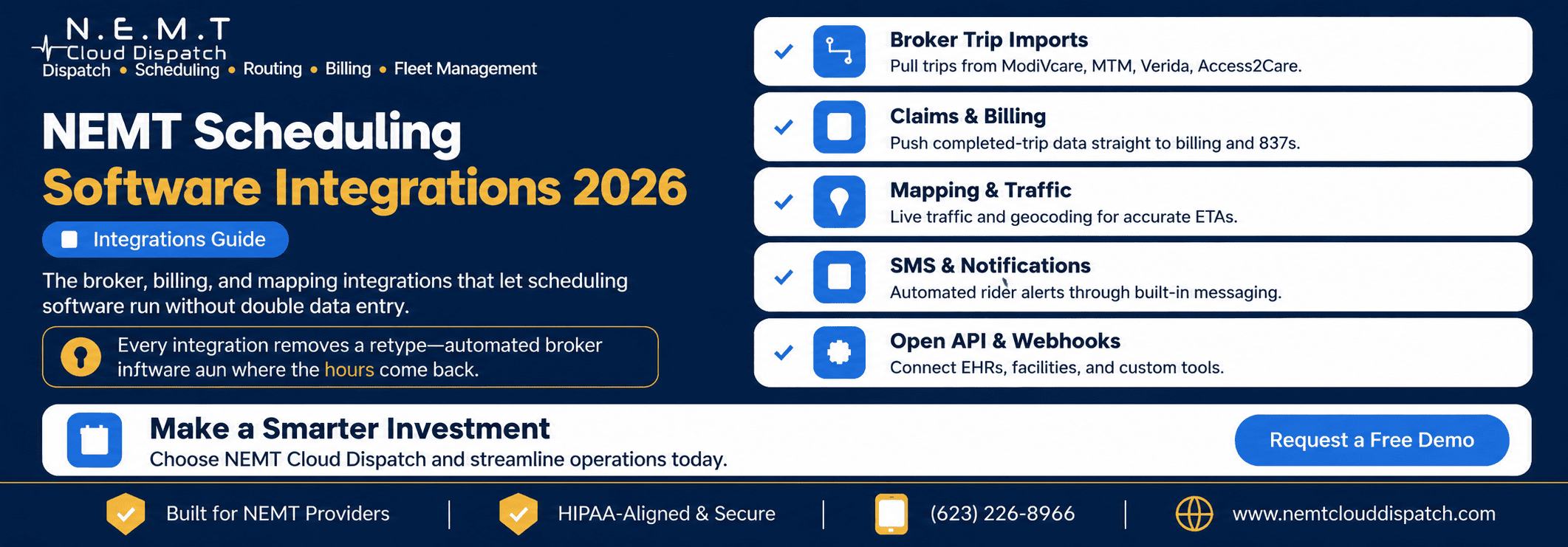
- Modivcare integration
- MTM integration
- Kaiser Permanente
- VectorCare
- Access2Care integration
- Alivi
- HBSS Connect Corp
- QRyde data exchange
Its published broker pages describe direct API-based trip imports, status updates, and billing workflows for Modivcare and MTM.
Providers should still confirm the connection available for their particular state, contract, broker program, and account.
One-way versus two-way broker integrations
A one-way integration may import trips but send nothing back.
That can save some entry time, but dispatchers may still have to log into the broker portal to:
- Accept or confirm trips
- Report arrival
- Report passenger pickup
- Mark a no-show
- Record completion
- Enter mileage
- Upload documentation
- Submit billing
A two-way connection can potentially import the trip and return required updates to the broker.
When evaluating a connection, ask the vendor to show the complete data flow rather than simply confirming that the broker name appears on an integration list.
What to test during a broker-integration demonstration
Ask the vendor to demonstrate these events:
- Import a newly assigned trip.
- Import an updated pickup time.
- Process a broker cancellation.
- Identify a duplicate trip.
- Send driver status back to the broker.
- Mark and transmit a rider no-show.
- Complete the ride.
- Produce the required billing record.
- Receive and display an integration error.
- Correct and resubmit rejected information.
This reveals whether the connection handles only the ideal workflow or also manages the exceptions that consume dispatcher time.
2. Scheduling, Dispatch, and Driver-App Synchronization
A broker integration creates limited value if the imported trip remains isolated inside the scheduler.
The trip should flow into real-time NEMT dispatching, where staff can assign drivers, monitor active service, respond to delays, and handle cancellations.
Once dispatched, the assignment should appear in the NEMT driver mobile app without another employee creating a separate manifest.
Driver actions should then update the same trip record.
Those actions may include:
- Trip acceptance
- Driver en route
- Arrival at pickup
- Passenger onboard
- Arrival at destination
- Trip completion
- Rider no-show
- Cancellation
- Mileage entry
- Driver notes
- Digital signature
- Photo documentation where permitted
- Vehicle inspection information
Why internal synchronization matters
An external broker integration cannot compensate for disconnected internal modules.
For example, a trip may import correctly from a broker but still fail operationally when:
- Dispatch cannot see the imported change.
- The driver app displays the original pickup address.
- GPS tracking is not associated with the trip.
- Billing receives no completion data.
- The broker receives a status different from dispatch.
The complete platform should share a single current version of the trip.
3. Claims, Billing, and EDI Integrations
A completed trip is also a potential billable event.
When scheduling and billing are disconnected, staff may have to reconstruct the ride using driver logs, timestamps, mileage records, signatures, and broker portals.
Connected NEMT invoicing and billing software can move completed-trip information into a billing queue without requiring the complete ride to be entered again.
Information that should flow into billing
A billable record may require:
- Passenger or member information
- Payer or broker
- Authorization number
- Date of service
- Pickup and drop-off addresses
- Service or mobility type
- Driver and vehicle
- Loaded mileage
- Wait time
- Pickup and drop-off timestamps
- Trip status
- Contract rate
- Digital signature
- Proof-of-service details
- Additional approved charges
The required fields vary by broker, payer, state, contract, and trip type.
837P and CMS-1500 support
CMS identifies the 837P as a standard electronic format used by healthcare professionals and suppliers to submit applicable claims. The CMS-1500 is the related standard paper claim form used in qualifying workflows.
NEMT providers should not assume that every trip is submitted through the same format. Some brokers require portal entry, CSV files, custom invoices, trip logs, or other broker-specific formats.
The software should support the formats required by the provider’s actual payer relationships rather than merely displaying “EDI” on a feature list.
Billing integration should include validation
Moving incorrect information faster does not improve billing.
Before submission, the platform should be able to identify missing or inconsistent fields such as:
- Missing authorization
- Incomplete member information
- Invalid service date
- Missing mileage
- Unclosed trip status
- Missing pickup or drop-off proof
- Duplicate claim
- Rate mismatch
- Missing payer information
The billing workflow should also make it possible to distinguish among:
- Not ready to bill
- Ready for review
- Submitted
- Accepted
- Rejected
- Denied
- Corrected
- Resubmitted
- Paid
Questions to ask about billing connections
Ask whether the system:
- Generates billing data or submits it directly
- Supports the required broker or payer format
- Receives rejection and denial information
- Displays reason codes
- Supports corrections and resubmissions
- Prevents duplicate submissions
- Tracks unbilled completed trips
- Exports to the company’s accounting system
- Maintains an audit history of billing changes
A downloadable spreadsheet is an export. It should not automatically be treated as a complete billing integration.
4. Mapping, Geocoding, Traffic, and Route Data
Reliable routes begin with reliable location data.
Geocoding converts an address into geographic coordinates. Routing services then use those coordinates to calculate distance, travel time, and possible routes.
Modern mapping platforms can also provide live or predictive traffic information, route matrices, navigation, and multi-stop route support.
NEMT Cloud Dispatch’s route-optimization software currently describes ETA, live-traffic, cellular GPS, multi-load routing, and driver-navigation capabilities. Its driver application also states that it works with Google Maps.
Why geocoding quality matters
An address can be technically valid while still producing a poor pickup location.
Examples include:
- A hospital with several entrances
- A medical campus containing multiple buildings
- A nursing facility with a separate transportation entrance
- An apartment complex with restricted gates
- A dialysis center located inside a shopping plaza
- A pickup point that is different from the postal address
The system should allow staff to retain entrance notes, unit numbers, landmarks, pickup instructions, and corrected map pins where necessary.
What an ETA should consider
An operational ETA may need to account for:
- Current vehicle location
- Current traffic
- Remaining route stops
- Passenger loading time
- Wheelchair securement time
- Facility release delays
- Driver status
- Updated route sequence
- Road closures
- Shared-ride pickups and drop-offs
An estimate created at 6:00 a.m. may no longer be useful at 2:00 p.m. if the day’s route has changed.
Questions to ask about mapping integrations
Ask:
- Which mapping provider is used?
- How frequently is traffic data refreshed?
- Are ETAs recalculated after route changes?
- Can dispatchers correct a map pin?
- Are hospital and facility entrances saved?
- Does the driver app support turn-by-turn navigation?
- What happens if mapping service is temporarily unavailable?
- Are map or navigation charges included in the subscription?
- Does the platform support multiple stops and route matrices?
- Can dispatch override an automatically suggested route?
Google’s official Maps Platform documentation describes routing, real-time traffic, navigation, route optimization, and geocoding capabilities that transportation platforms may use when building these workflows.
5. SMS and Rider-Notification Integrations
Automated communication can reduce repetitive calls and keep passengers informed about upcoming service.
A connected NEMT SMS notification service may support:
- Booking confirmation
- Day-before reminders
- Pickup-window reminders
- Driver-on-the-way alerts
- Driver-arriving alerts
- Delay notifications
- Cancellation notices
- Rescheduling notices
- Return-trip updates
- Facility notifications
NEMT Cloud Dispatch currently states that its SMS feature is integrated with Twilio and available upon request.
Notifications must use live trip data
An automated message is useful only when the information is current.
The notification service should respond correctly when:
- The pickup time changes.
- The trip is cancelled.
- The driver is reassigned.
- The vehicle is delayed.
- The passenger telephone number changes.
- A will-call return becomes active.
- A recurring trip is temporarily paused.
Sending an old pickup time automatically can create more confusion than making no automated contact at all.
Delivery tracking
Message creation does not mean message delivery.
Messaging providers such as Twilio can report statuses that may include queued, sent, delivered, undelivered, or failed. The NEMT platform should make relevant failures visible so staff know when an important notification did not reach the passenger.
Consent and communication preferences
The software should allow staff to record:
- SMS opt-in or consent
- Opt-out status
- Preferred telephone number
- Preferred language
- Caregiver contact
- Facility contact
- Voice-call preference
- Accessibility requirements
Messages should avoid including unnecessary sensitive medical or personal information.
SMS pricing questions
Ask whether messaging is:
- Included in the subscription
- An optional add-on
- Charged per message
- Sold through monthly bundles
- Subject to carrier charges
- Limited by user, vehicle, or trip volume
- Available for both inbound and outbound messages
- Logged against the trip record
Estimate the cost using expected monthly message volume rather than evaluating only the price of one text.
6. Facility Portals and Healthcare-System Connections
Brokers are not the only source of transportation requests.
Hospitals, dialysis centers, skilled nursing facilities, behavioral health organizations, adult day programs, and other care partners may request rides directly.
A secure NEMT facility portal can allow authorized staff to:
- Request transportation
- Enter passenger and appointment details
- Select mobility requirements
- Review scheduled trips
- Track trip status
- Submit a return-trip request
- View an ETA
- Cancel or update a ride
- Review previous requests
This can reduce telephone calls, emails, faxes, and incomplete handwritten requests.
Portal versus full system integration
A portal is not the same as a direct electronic health record or facility-system integration.
A portal gives facility staff a structured place to enter and monitor requests. A direct integration may transfer approved information between the facility’s existing system and the transportation platform.
Both approaches can be useful.
For many facilities, a secure portal may be faster and less complex to implement. Larger organizations may need an API, HL7 or FHIR-related workflow, secure file exchange, or another customized connection.
Before promising EHR integration, confirm:
- The exact system involved
- The information that must be exchanged
- Whether protected health information is necessary
- Which organization controls the technical interface
- Required security reviews
- Testing requirements
- Responsibility for ongoing maintenance
7. Eligibility, Authorization, and Coverage Validation
Eligibility, authorization, and trip assignment are related but not identical.
A passenger may be enrolled in Medicaid but still require a valid trip authorization under the applicable state, managed-care, broker, or program rules.
In many broker-based workflows, the transportation provider receives a trip that has already passed through the broker’s eligibility and authorization process. In other workflows, staff may need to verify additional information before dispatch.
CMS notes that Medicaid transportation rules and approval procedures can differ by state and program. Providers are responsible for following the requirements that apply where they operate.
Information the scheduling workflow may need to validate
Depending on the contract, validation may include:
- Current member eligibility
- Valid trip authorization
- Approved date of service
- Approved origin and destination
- Covered trip purpose
- Approved transportation mode
- Authorized mileage
- Escort or attendant approval
- Recurring-trip authorization period
- Broker confirmation number
- Required notice period
Why validation should happen early
A missing authorization is easier to resolve before a vehicle is dispatched than after the ride has been completed.
Where technically and contractually available, validation should occur during intake or scheduling.
If direct eligibility checking is not available, the platform should at least make authorization fields visible, required where appropriate, and easy to audit.
Questions to ask vendors
Ask:
- Does the platform check eligibility or only store eligibility information?
- Does it validate authorizations?
- Which payers or brokers support electronic validation?
- Is validation real time or batch-based?
- What happens when eligibility cannot be confirmed?
- Can a dispatcher override the warning?
- Is the override recorded in an audit log?
- Does the system distinguish a coverage failure from a technical connection failure?
A marketing claim of “eligibility integration” is incomplete without answers to these questions.
8. Accounting and Payment Connections
Transportation companies may also need completed financial information to move into accounting or payment systems.
NEMT Cloud Dispatch’s billing pages currently describe:
- QuickBooks and Sage exports
- Stripe
- Authorize.net
- PayPal
- PDF, CSV, and HTML invoice outputs
Providers should determine whether each connection is a live synchronization, payment gateway, file export, or manual upload.
Export versus synchronization
A CSV export may be perfectly adequate for a small operation.
Larger companies may need a deeper connection that can:
- Create customer records
- Post invoices
- Record payments
- Apply adjustments
- Track outstanding balances
- Synchronize account codes
- Prevent duplicate entries
- Reconcile deposits
- Return payment status to the transportation platform
The required level of integration depends on transaction volume, staffing, accounting controls, and the company’s existing software.
9. Open APIs, Webhooks, and Custom Integrations
No transportation vendor can pre-build every connection that every provider may eventually need.
An API can allow an authorized external system to read, create, or update information according to defined rules.
A webhook allows the platform to notify another system when a particular event occurs.
Possible events include:
- Trip created
- Trip changed
- Trip cancelled
- Driver assigned
- Driver arrived
- Passenger picked up
- Trip completed
- Rider no-show
- Claim submitted
- Claim rejected
- Payment posted
Why webhooks are useful
Without a webhook, another system may have to check repeatedly for new information.
With a webhook, the platform can notify the connected system when an event occurs, allowing faster and more efficient data exchange.
What to request from a vendor
Do not rely only on the phrase “open API.”
Request:
- API documentation
- Available endpoints
- Supported data fields
- Authentication method
- Role and permission controls
- Rate limits
- Sandbox or test environment
- Webhook event list
- Retry behavior
- Error responses
- Versioning policy
- Change-notification policy
- Technical support process
- Pricing
- Data-retention rules
NEMT Cloud Dispatch publicly offers custom and on-demand broker integrations. However, buyers requiring general API or webhook access should confirm the availability, scope, documentation, pricing, and support directly during evaluation.
A willingness to build a custom connection is not automatically the same as providing a documented public API.
10. Security, Privacy, and Business Associate Requirements
NEMT integrations may transmit passenger names, addresses, appointment information, member identifiers, mobility requirements, telephone numbers, and trip histories.
Every additional connection increases the number of systems and organizations that may create, receive, maintain, or transmit that information.
The U.S. Department of Health and Human Services explains that HIPAA-covered entities may need written business associate agreements when vendors perform functions involving protected health information on their behalf. The HIPAA Security Rule also requires appropriate administrative, physical, and technical safeguards for electronic protected health information.
Applicability depends on the organization, relationship, information involved, and services performed. Providers should obtain qualified compliance or legal guidance for their circumstances.
Integration-security questions
Ask the vendor:
- Will the connection transmit protected health information?
- Is a business associate agreement available where required?
- Is data encrypted in transit and at rest?
- How are API credentials secured?
- Can access be limited by role?
- Are user and integration actions logged?
- How long are logs retained?
- How are terminated users removed?
- Which subcontractors handle the information?
- How are security incidents reported?
- Can unnecessary fields be excluded?
- Where is the data stored?
- How is data returned or deleted at contract termination?
An integration should exchange only the information needed for the intended workflow.
11. What Separates a Real Integration From a Basic Export?
Vendors may use the word “integration” for several very different capabilities.
Use these criteria to understand what is actually being offered.
| Evaluation area | Strong integration | Warning sign |
|---|---|---|
| Data direction | Sends and receives required information | Imports data but cannot return status |
| Update speed | Real-time or clearly defined frequent updates | Nightly files for same-day operations |
| Field coverage | Includes all operationally required fields | Important mobility or authorization fields are omitted |
| Change handling | Processes cancellations and modifications | Only imports newly created trips |
| Error handling | Visible queue, reason, retry, and reconciliation | Failed records disappear silently |
| Duplicate control | Detects repeated trips and authorizations | Same trip can import more than once |
| Audit history | Records source, time, user, and changes | No way to trace how information changed |
| Monitoring | Connection health and failures are visible | Staff learn about failure from a missed trip |
| Security | Documented permissions, encryption, and logging | Shared credentials or unclear data controls |
| Support | Clear ownership and escalation process | Vendor and broker blame each other |
| Pricing | Written setup and recurring costs | Fees appear only after implementation |
| Data portability | Records can be exported in usable formats | Data is difficult to retrieve when leaving |
12. Integration Questions to Ask Before Signing
Request written answers to these questions:
- Is the connection currently live or still planned?
- Which customers are using it in production?
- Is it direct or handled through a third party?
- Is data exchanged through an API, file, portal automation, or manual export?
- Is the integration one-way or two-way?
- Which trip fields are imported?
- Which statuses are transmitted back?
- How quickly do updates appear?
- How are cancellations handled?
- How are duplicate trips detected?
- What happens when a record fails?
- Can staff see and correct integration errors?
- Does the system retry failed transmissions?
- How are outages communicated?
- What fallback process is available?
- Is a test environment provided?
- Who performs acceptance testing?
- Is setup included in the subscription?
- Are there recurring integration fees?
- Are there per-trip or transaction fees?
- Is technical support available outside normal business hours?
- Is API or webhook documentation available?
- Can all imported and transmitted information be audited?
- Can data be exported after contract termination?
- How are privacy and security responsibilities documented?
13. How to Test an Integration End to End
Do not test each module separately.
Use a realistic trip and follow it through every connected system.
Step 1: Import the trip
Start with an actual broker or facility workflow.
Confirm that passenger details, addresses, times, mobility requirements, authorization information, rates, and notes arrive correctly.
Step 2: Change the trip at the source
Modify the pickup time or destination through the broker or source system.
Confirm how quickly the transportation platform updates and whether dispatch is alerted.
Step 3: Assign and dispatch the trip
Assign a suitable driver and vehicle.
Confirm the assignment appears correctly in the driver application.
Step 4: Execute the trip
Have the driver record:
- En route
- Arrived
- Passenger onboard
- Drop-off
- Completed
- Mileage
- Permitted proof of service
Watch whether dispatch and the broker receive the appropriate updates.
Step 5: Generate rider communication
Confirm that reminders and ETA messages use the updated trip information.
Review delivery status and failure handling.
Step 6: Move the trip into billing
Check that required timestamps, mileage, authorization, rate, and documentation appear in the billing queue without re-entry.
Step 7: Trigger an error
Remove a required billing field or simulate a failed transmission.
Verify that the platform displays the error, explains it, and supports correction and resubmission.
Step 8: Review reporting and audit history
Confirm that reporting identifies:
- Trip source
- Driver performance
- On-time status
- Billing status
- Integration events
- Record changes
- Transmission failures
The test is successful only when the same trip remains consistent from intake through billing.
Quick-Reference Integration Checklist
Before selecting NEMT software:
- List every broker that supplies trips.
- List every facility that requests transportation.
- Document the existing billing and accounting tools.
- Confirm which integrations are live today.
- Separate direct APIs from files and manual exports.
- Verify whether every connection is one-way or two-way.
- Review imported and transmitted fields.
- Test cancellations and schedule changes.
- Review duplicate and error handling.
- Confirm mapping, traffic, and geocoding capabilities.
- Calculate SMS and transaction-based charges.
- Verify authorization or eligibility workflows.
- Request API and webhook documentation.
- Review security and business associate requirements.
- Confirm setup, maintenance, and support responsibilities.
- Test one trip from import through billing.
- Obtain all integration costs in writing.
The Bottom Line
NEMT integrations determine how much manual work transportation software actually removes.
A broker logo on a vendor page is not enough. Providers need to understand what data moves, which direction it moves, how quickly it moves, and what happens when the connection fails.
The most valuable integrations create an uninterrupted operational path:
- The trip arrives from a broker or facility.
- Scheduling validates and organizes it.
- Dispatch assigns the appropriate driver and vehicle.
- The driver app reports what happens on the road.
- GPS and mapping support route visibility and ETAs.
- Riders and facilities receive current updates.
- Completed-trip information moves into billing.
- Status, claims, and reports return to the required systems.
Every reliable connection should remove a manual step without creating a new blind spot.
When evaluating vendors, trace a real trip from its original source to final billing. Test modifications, cancellations, failures, duplicate records, and resubmissions—not only a perfect ride.
Providers can review the current NEMT Cloud Dispatch broker integrations, compare the published NEMT software pricing, or schedule a personalized integration demonstration using their own broker, billing, mapping, and facility workflows.
Frequently Asked Questions
Does NEMT scheduling software integrate with brokers like ModivCare and MTM?
Leading platforms offer direct, two-way integrations with major brokers such as ModivCare, MTM, Verida, and Access2Care, importing trips and pushing status and claims back automatically.
Can scheduling software connect to my billing system?
Yes. Completed-trip data — times, mileage, and signatures — can flow into claims and 837 generation, reducing re-entry and denials.
What if the platform does not have an integration I need?
An open API and webhooks let you or a developer build the connection to EHRs, facilities, or custom tools. Avoid closed platforms if you expect to grow your stack.
Are integrations usually included in the price?
It varies. Some are standard; broker or billing connections are sometimes add-ons. Always confirm which integrations are included before you compare quotes.