If your phones ring all morning and your schedule still ends the day in disarray, the bottleneck usually is not your drivers. It is the way trips are booked, sequenced, assigned, and handed off.
The right NEMT scheduling software turns that daily scramble into a calm, repeatable process. Every trip is captured once, matched to an appropriate vehicle and driver, and tracked from initial booking through completion and billing.
The Centers for Medicare & Medicaid Services describes non-emergency medical transportation as an important benefit for eligible people who need assistance traveling to and from medical appointments. For transportation providers, delivering that service consistently requires more than a calendar and a phone.
This guide explains what NEMT scheduling software does, which capabilities matter most, how pricing typically works, and how to implement a new system without putting a single ride at risk.
What Does NEMT Scheduling Software Actually Do?
At its core, NEMT scheduling software takes a transportation request from a broker, healthcare facility, discharge planner, or private-pay customer and turns it into a confirmed trip.
A complete trip record may include:
- Pickup and drop-off addresses
- Appointment time and pickup window
- Passenger contact information
- Ambulatory, wheelchair, bariatric, stretcher, oxygen, or escort requirements
- Assigned driver and vehicle
- Broker or facility information
- Trip mileage and estimated cost
- Return-trip or will-call instructions
- Notes, signatures, timestamps, and proof of service
A connected NEMT software platform keeps this information on one live trip record. When an appointment time changes, a dialysis return runs late, a driver becomes unavailable, or a broker cancels a ride early in the morning, the update flows through one system.
Schedulers, dispatchers, drivers, billing staff, and facility partners can work from the same information instead of relying on separate spreadsheets, paper notes, calls, and text messages.
NEMT Scheduling vs. Dispatching
Scheduling and dispatching are closely connected, but they perform different jobs.
Scheduling happens before the trip is executed. It involves recording the trip, reserving the pickup window, matching mobility requirements, checking driver and vehicle availability, and planning the route.
Dispatching manages the live execution of that schedule. It includes assigning or reassigning drivers, tracking active trips, handling delays and no-shows, communicating with drivers, and responding to same-day changes.
The most effective systems connect scheduling with real-time NEMT dispatching so information does not have to be entered again when a scheduled trip becomes active.
Problems NEMT Scheduling Software Is Built to Solve
Most transportation providers begin looking for scheduling software after experiencing the same recurring operational problems.
Double-Bookings and Schedule Gaps
Manual calendars cannot evaluate the entire fleet at once. A vehicle may be assigned to overlapping trips during one part of the day while another vehicle remains idle.
Conflict detection allows schedulers to identify overlapping assignments, unrealistic travel times, unavailable vehicles, and incompatible mobility requirements before the schedule is published.
Slow and Error-Prone Trip Intake
Manually transferring trips from broker portals, emails, facility requests, and phone calls takes time. It can also introduce errors in addresses, appointment times, passenger details, and authorization numbers.
Direct NEMT broker integrations can reduce repetitive data entry by importing trip information into the scheduling workflow.
Recurring-Trip and Standing-Order Problems
Dialysis, physical therapy, behavioral health, adult day care, and other recurring appointments may operate several days each week.
Without structured standing orders, staff may have to recreate the same rides repeatedly. This increases administrative work and creates opportunities for one segment of a recurring trip to be missed.
Will-Call and Return-Trip Chaos
Will-call returns are difficult to predict because the rider’s exact release time is unknown. When these trips are managed through handwritten notes or dispatcher memory, passengers can be overlooked.
A structured will-call queue keeps unassigned returns visible until the facility or passenger confirms that the rider is ready.
Limited Fleet Visibility
When schedulers cannot see driver locations and trip progress, every “Where is my ride?” call becomes a manual investigation.
Connected scheduling, dispatch, and fleet management tools give office staff a clearer view of available vehicles, active routes, delays, inspections, and maintenance requirements.
Weak Proof of Service
Trip documentation may be requested during broker reviews, billing disputes, or Medicaid compliance audits. Reconstructing a completed ride from text messages, handwritten logs, and driver recollection is inefficient and risky.
A digital trip record can retain GPS-based timestamps, pickup and drop-off confirmations, signatures, photos, mileage, status history, and driver notes. Providers should also review applicable state, broker, payer, and CMS NEMT provider guidance when developing their documentation procedures.
How the Daily Scheduling Workflow Changes
In a manual operation, trips may be entered into a spreadsheet or written on a dispatch board. Assignments are often based on staff knowledge of which driver is available and where each vehicle is expected to be.
When one appointment changes, the effect can spread across several other trips. Staff must call drivers, update multiple records, and determine whether the remaining schedule is still achievable.
With connected scheduling software, trips from brokers, facilities, and private-pay customers enter one central queue. The system can check each booking for conflicts and help schedulers match it to a suitable driver and vehicle.
Integrated NEMT route optimization can then sequence compatible trips, reduce unnecessary mileage, and group shared rides when appointment windows, passenger needs, and vehicle capacity allow.
When the day changes, dispatchers can adjust the active schedule and send updated assignments or route information to drivers. A cancelled trip may open space for a same-day request instead of leaving an unplanned gap in the schedule.
Core Capabilities to Look For
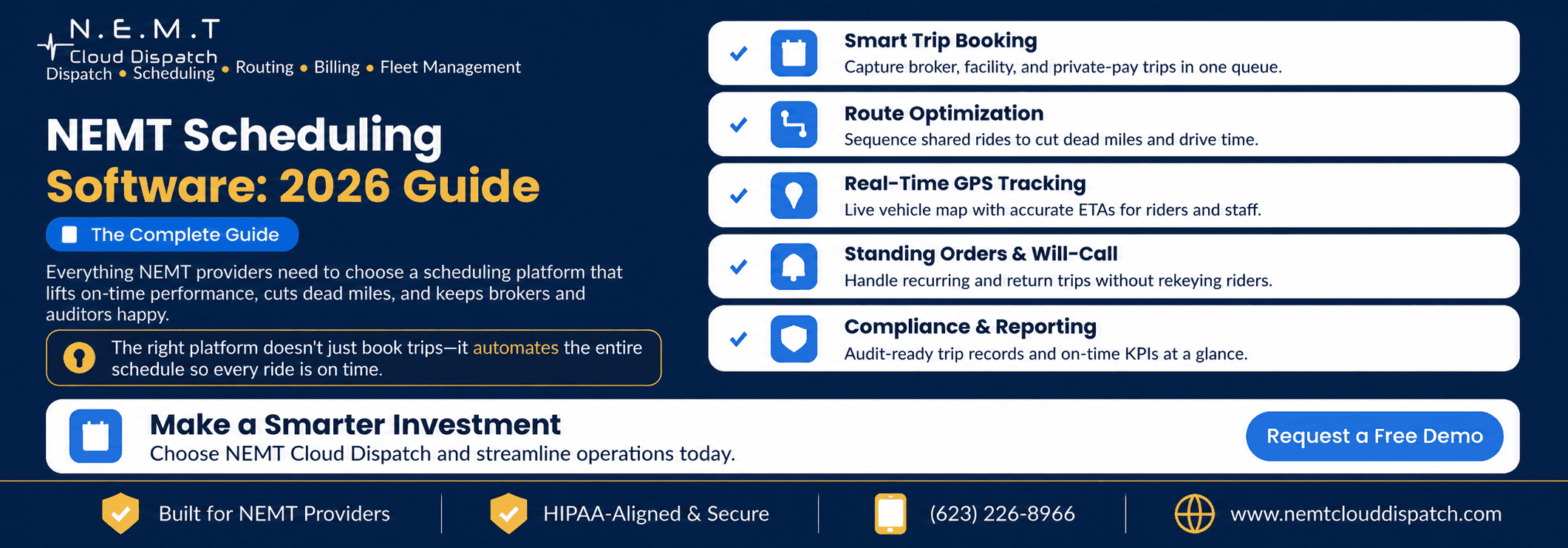
When evaluating NEMT scheduling software, focus on capabilities that improve service reliability, staff productivity, fleet utilization, and billing accuracy.
1. Centralized Trip Booking
The system should capture broker, facility, and private-pay trips in one place.
Schedulers should be able to record appointment times, pickup windows, passenger needs, trip notes, authorization details, companions, escorts, and return-trip instructions without maintaining separate records.
Healthcare organizations should also be able to submit requests through a secure NEMT facility portal when appropriate.
2. Conflict Detection and Vehicle Matching
The software should identify scheduling conflicts before a trip is assigned.
Vehicle matching should consider factors such as:
- Wheelchair accessibility
- Passenger and mobility-device capacity
- Bariatric equipment
- Oxygen requirements
- Stretcher capability
- Driver certifications
- Escort or two-person team requirements
- Vehicle and driver availability
A system should not recommend an assignment simply because a vehicle is nearby. It must also confirm that the driver and vehicle are qualified for the passenger’s needs.
3. Route Optimization
Route optimization should sequence trips based on pickup windows, appointment times, travel duration, vehicle capacity, and rider requirements.
For shared rides, the system should group passengers only when their routes and time windows are genuinely compatible. The goal is to reduce deadhead mileage without creating excessive ride times or late appointments.
4. Standing Orders and Recurring Trips
Recurring-trip tools should allow schedulers to create a trip pattern once and generate future rides automatically.
The system should also make it easy to pause, modify, or cancel one occurrence without accidentally changing the entire standing order.
5. Will-Call Management
Will-call rides should remain visible in a dedicated queue until the rider is ready.
Dispatchers should be able to see the original appointment, destination, passenger requirements, estimated return area, and available vehicles without searching through unrelated trips.
6. Real-Time GPS and ETA Visibility
A live map should show the location and status of active vehicles.
Accurate visibility helps schedulers and dispatchers answer rider questions, identify developing delays, and make better reassignment decisions. Depending on the platform, ETA notifications may also be shared with riders, facilities, or authorized staff.
7. Broker Integrations
Many state Medicaid agencies use transportation brokers to coordinate NEMT services, as explained in the CMS overview of brokers in the Medicaid program.
Broker integration capabilities may include:
- Automated trip imports
- Updated trip and passenger information
- Cancellation and modification syncing
- Trip-status transmissions
- Broker-specific billing exports
- Claim or invoice preparation
- Authorization and reference-number tracking
NEMT Cloud Dispatch currently supports workflows involving Modivcare, MTM, Kaiser Permanente, VectorCare, Access2Care, Alivi, HBSS Connect Corp, and QRyde data exchange.
8. Driver Mobile Application
A connected NEMT driver app should give drivers the information they need without requiring repeated calls to dispatch.
Useful capabilities include:
- Daily trip manifests
- Turn-by-turn navigation
- Passenger and facility instructions
- Trip-status updates
- Dispatcher communication
- Pre-trip vehicle inspections
- GPS-based pickup and drop-off timestamps
- Digital signatures or photo documentation
- Offline access in areas with weak connectivity
Driver adoption is especially important. The schedule will only remain accurate when drivers update trip statuses consistently.
9. Billing and Claims Support
Completed trip data should flow into the NEMT invoicing and billing workflow without requiring staff to recreate the ride.
Depending on payer and contract requirements, billing tools may support broker-specific invoices, CMS-1500 forms, 837P files, mileage calculations, private-pay invoices, and documentation review before submission.
10. Reporting and Operational KPIs
Managers should be able to monitor performance without manually combining multiple spreadsheets.
Important NEMT metrics include:
- On-time pickup percentage
- On-time appointment arrival
- Completed and cancelled trips
- No-show rate
- Trips per vehicle
- Trips per driver
- Vehicle utilization
- Loaded and unloaded mileage
- Deadhead-mile percentage
- Average wait time
- Revenue per completed trip
- Claim rejection or denial rate
The best reporting system is not necessarily the one with the most dashboards. It is the one that helps managers identify a problem and take action.
How Much Does NEMT Scheduling Software Cost?
NEMT software pricing typically follows one of several models:
- Monthly fee per vehicle
- Monthly fee per driver
- Fee per completed trip
- Flat monthly subscription
- Tiered pricing based on fleet size
- Custom enterprise pricing
Setup, data migration, broker integrations, training, support, custom development, and mobile applications may be included in the subscription or charged separately.
Compare the total operating cost rather than only the advertised monthly rate. A low-cost platform can become expensive if it requires extensive manual entry, paid add-ons, per-trip charges, or additional billing software.
You can review the published NEMT Cloud Dispatch pricing plans when comparing subscription structures.
Software value should also be measured against operational outcomes. Improvements in on-time performance, vehicle utilization, documentation, billing accuracy, and dispatcher productivity may outweigh a relatively small difference in monthly subscription cost.
How to Deploy New Software Without Disrupting Service
The riskiest implementation approach is switching systems without testing the full workflow.
A safer rollout follows a structured process.
Map Every Trip Source
Document how trips currently arrive from:
- Brokers
- Hospitals and discharge departments
- Dialysis centers
- Skilled nursing facilities
- Behavioral health facilities
- Adult day programs
- Private-pay customers
- Recurring standing orders
Identify which sources can be integrated and which will continue to require manual entry.
Clean the Existing Data
Review passenger profiles, addresses, mobility requirements, vehicle records, driver certifications, recurring trips, and broker information before migration.
Moving incorrect or duplicate information into a new system will reproduce the same problems in a different interface.
Load Standing Orders First
Recurring trips should be tested before go-live because one configuration error can affect many future rides.
Verify pickup days, appointment times, return instructions, service dates, mobility needs, vehicle restrictions, and holiday exceptions.
Test the Entire Trip Lifecycle
Do not test only trip booking. Follow sample trips through:
- Intake
- Scheduling
- Vehicle and driver assignment
- Route planning
- Driver acceptance
- Pickup confirmation
- Drop-off confirmation
- Documentation
- Billing
- Reporting
This reveals gaps that may not be visible during a product demonstration.
Run Both Systems in Parallel
Operate the new schedule alongside the existing process for several days or for an appropriate testing period.
Compare:
- Total scheduled trips
- Driver assignments
- Pickup windows
- Standing orders
- Will-call trips
- Cancellations
- Completed-trip records
- Billing totals
- On-time performance
Resolve discrepancies before making the new platform the only source of truth.
Train Everyone Who Updates the System
Training should include schedulers, dispatchers, drivers, billing staff, managers, and facility users where applicable.
Drivers should understand exactly when to accept a trip, mark arrival, record pickup, report a no-show, document drop-off, and capture proof of service.
Choose a Controlled Go-Live Date
Avoid launching during the busiest day of the week or during a period with unusual trip volume.
Have clear escalation procedures for login problems, missing trips, device issues, incorrect assignments, broker synchronization errors, and driver questions.
Signs Your Operation Is Ready for Scheduling Software
A provider does not need a large fleet to benefit from better scheduling. The following signs often indicate that software can deliver a quick operational return.
Schedulers Are Overwhelmed
One person may be switching among multiple broker portals, spreadsheets, phone calls, emails, and text messages during the busiest hours.
Centralized trip intake and recurring-trip automation can return meaningful time to the scheduling team.
On-Time Performance Is Declining
Late pickups may result from overlapping assignments, unrealistic travel times, poor route sequencing, or a lack of live driver visibility.
Conflict detection and real-time schedule adjustments can help staff identify these risks earlier.
Vehicles Frequently Run Empty
Empty mileage cannot always be eliminated, but it should be visible and measured.
Routing and utilization reports may reveal opportunities to combine compatible trips, adjust driver start locations, or rebalance service areas.
Will-Call Trips Are Being Missed
A dedicated will-call workflow can reduce the risk of riders becoming stranded after an appointment.
Audits and Billing Reviews Are Painful
When proof of a completed trip requires staff to search through paper logs, messages, and driver recollections, documentation is too fragmented.
Trip-linked records make it easier to retrieve timestamps, signatures, mileage, status history, and service notes.
The Business Is Growing Faster Than Its Processes
Adding drivers and vehicles without improving the underlying workflow can increase confusion instead of increasing capacity.
A scalable scheduling and dispatch platform establishes repeatable processes before trip volume becomes unmanageable.
Quick Checklist for Comparing NEMT Scheduling Platforms
Before selecting a system, ask each vendor to demonstrate the following with realistic trip scenarios:
- Import a broker trip without manual re-entry.
- Create a recurring dialysis schedule.
- Identify an overlapping driver or vehicle assignment.
- Match a wheelchair trip to a compatible vehicle.
- Add and manage a will-call return.
- Group compatible trips into a shared route.
- Reassign trips after a driver becomes unavailable.
- Send the updated manifest to the driver.
- Capture pickup and drop-off proof.
- Convert the completed trip into a billable record.
- Produce an on-time-performance report.
- Retrieve the complete trip history for an audit.
A polished dashboard is useful, but a realistic workflow demonstration provides a much clearer picture of whether the software will fit your operation.
The Bottom Line
NEMT scheduling software is no longer just a convenience for growing transportation providers. It is the system that determines whether trips are recorded accurately, vehicles are assigned appropriately, drivers receive clear information, and passengers arrive on time.
The right platform should book every trip once, connect scheduling with dispatch, keep the fleet balanced, and preserve a reliable record from intake through billing.
Choose a system based on the workflows that protect your service quality and broker relationships—not only on the number of features listed on a sales page. Then implement it through data cleanup, realistic testing, driver training, and a parallel rollout so service remains stable throughout the transition.
To evaluate how these workflows would operate with your own vehicles, brokers, recurring trips, and billing requirements, schedule a NEMT Cloud Dispatch demonstration.
Frequently Asked Questions
What is NEMT scheduling software?
NEMT scheduling software is a system for booking non-emergency medical transportation trips, checking for assignment conflicts, matching passenger needs with appropriate drivers and vehicles, and creating an organized schedule for dispatch.
How is scheduling different from dispatching?
Scheduling plans a trip before service begins by reserving the time window and selecting suitable resources. Dispatching manages the live execution of the trip, including driver assignments, status updates, location tracking, delays, cancellations, and same-day changes.
Does scheduling software connect to brokers like ModivCare and MTM?
Yes. Leading NEMT scheduling platforms import trips from major brokers and push trip status and claim data back, so schedulers aren’t retyping trips from portals.
How much does NEMT scheduling software cost?
Common models are per-vehicle monthly, per-completed-trip, or flat-rate unlimited plans, often with separate setup and support fees. Compare total cost and the on-time improvement it delivers, not just the monthly price.