Changing the system that runs your transportation business can feel risky. Dispatchers worry about missed trips. Drivers worry about new app instructions. Billing teams worry about lost records. Owners worry about downtime, frustrated brokers, and service interruptions.
But the real risk is staying with a platform that slows your operation down.
If your current system creates manual work, limits reporting, delays billing, or makes broker communication harder, switching NEMT software can be the smartest move for long-term growth. The key is not to rush the move. The key is to plan it carefully, protect active trips, train your team, and go live with a system built for real NEMT workflows.
At NEMT Cloud Dispatch, we help providers manage dispatching, scheduling, routing, fleet management, billing, broker support, and reporting from one organized platform. This guide explains how to move to better software without disrupting daily service.
Quick Answer: Can You Switch NEMT Software Without Downtime?
Yes. Providers can switch systems smoothly when they prepare data early, map their workflows, train staff, test active trip scenarios, and launch in phases. A strong plan reduces confusion and keeps dispatching, driver communication, billing, and broker coordination moving.
The safest approach to switching NEMT software is to treat the process as an operational project, not just a technical setup. Your team should know what data is moving, who is responsible for each step, how trips will be handled during the change, and when the new system becomes the source of truth.
Why NEMT Providers Delay the Switch
Many providers know their current software is not working, but they still delay the decision. The reasons are understandable:
- They fear service disruption.
- They worry about losing trip history.
- They do not want to retrain dispatchers and drivers.
- They have active broker trips to protect.
- They are unsure how billing records will move.
- They believe the transition will take too long.
These concerns are valid. NEMT is a time-sensitive operation, and every ride matters. According to the official CMS non-emergency medical transportation guidance, NEMT helps eligible members get to and from medical appointments when transportation support is needed.
Still, delaying a needed upgrade can create more problems. Outdated tools can increase manual calls, create dispatch confusion, slow billing, and make growth harder. When the daily workaround becomes normal, it may be time to move forward.
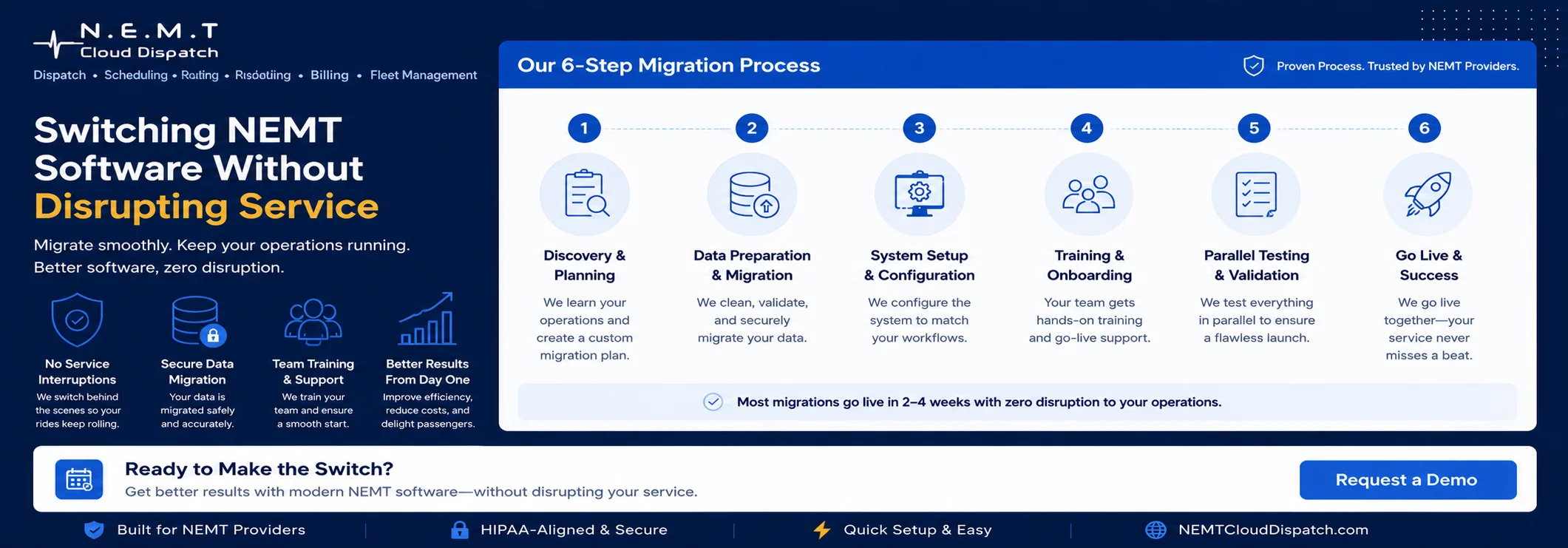
1. Start With a Clear Transition Plan
A smooth move begins before the new software is activated. Create a simple transition plan that explains your current workflow, your new workflow, and the people responsible for each stage.
Your plan should include:
- Current dispatching process
- Scheduling rules and recurring rides
- Driver and vehicle lists
- Broker workflows
- Billing requirements
- Reporting needs
- Training dates
- Go-live timeline
- Backup communication plan
This is where NEMT software implementation becomes important. The right vendor should help you understand setup steps, training expectations, and operational milestones before the launch date.
NEMT Cloud Dispatch supports providers with a practical onboarding process so teams can prepare schedules, drivers, vehicles, routes, billing workflows, and broker-related details with more confidence.
2. Prepare Your Data Before Migration
Data quality can make or break the transition. Before you import anything into a new platform, review your existing records and clean up outdated information.
Important data to prepare includes:
- Passenger profiles
- Recurring trips
- Driver records
- Vehicle records
- Broker details
- Pickup and drop-off locations
- Mobility notes
- Billing information
- Trip history
- User roles
A successful NEMT software migration depends on clean, organized data. If old records contain duplicates, missing phone numbers, outdated addresses, or unclear trip notes, those issues can follow you into the new system.
This is also the best time to confirm what information must be migrated immediately and what can be archived. For example, active recurring rides and driver records may need priority, while older trip history may be stored separately for reference.
When NEMT Cloud Dispatch helps providers prepare for NEMT data migration, the goal is simple: move the information your team needs while reducing clutter that slows adoption.
3. Protect Dispatching and Scheduling During the Move
Dispatching and scheduling are the most sensitive parts of the switch. Your team cannot pause service while software changes happen. Rides still need to be scheduled, assigned, tracked, completed, and documented.
Before go-live, test the workflows your team handles every day:
- Recurring dialysis rides
- Same-day cancellations
- Wheelchair trips
- Multi-leg trips
- Will-call rides
- Driver reassignments
- Route changes
- No-shows
- Broker updates
Your new system should make these tasks easier, not harder. With NEMT dispatch software and NEMT scheduling software, NEMT Cloud Dispatch helps providers coordinate trips, manage driver assignments, and keep schedules organized during busy service days.
When switching NEMT software, ask your vendor to demonstrate your actual dispatch and scheduling process before your team goes live. A real workflow demo gives dispatchers confidence and reduces launch-day surprises.
4. Train Your Team by Role
Training should not be the same for everyone. Dispatchers, drivers, billers, managers, and administrators use different parts of the system.
A strong training plan should cover:
- Dispatcher workflow
- Driver mobile app steps
- Billing review process
- Broker workflow handling
- Manager reporting
- User permissions
- Daily troubleshooting
- Escalation steps
The most effective NEMT software implementation focuses on real tasks, not generic software tours. Dispatchers should practice assigning rides. Drivers should practice viewing trips and updating statuses. Billing teams should review completed rides. Managers should test reports.
NEMT Cloud Dispatch helps teams learn the platform around the work they already do: dispatching, scheduling, routing, fleet visibility, billing, broker support, and reporting.
5. Run a Short Parallel Testing Period
A parallel testing period means your team compares old and new workflows before fully committing to the new system. This does not need to last for months. Even a short test can reveal gaps.
During testing, check:
- Are recurring trips accurate?
- Do drivers see the correct trip details?
- Can dispatchers update trips quickly?
- Are cancellations and no-shows documented?
- Can billing review completed ride data?
- Are broker details visible?
- Do reports match expectations?
This step makes switching NEMT software safer because your team can fix small issues before they affect live operations.
For providers that depend heavily on broker trip volume, it is also smart to review broker integration support and confirm how trip information will be managed after go-live.
6. Check Billing, Claims, and Documentation
Billing disruption is one of the biggest concerns during a software change. Your team needs accurate trip data, mileage, driver updates, broker details, and service notes.
Before launch, confirm:
- Which completed trips remain in the old system
- Which active trips move to the new system
- How billing staff will access historical records
- How broker details will be reviewed
- How reports will be exported
- Who handles billing questions after launch
This is one reason NEMT software migration should include both operations and billing teams. Dispatchers may focus on live trips, but billers need clean records after the ride is complete.
With NEMT billing software, NEMT Cloud Dispatch helps providers keep trip information easier to review so billing teams can work with clearer operational data.
7. Confirm Security and Access Controls
NEMT providers often handle sensitive passenger and trip information. During any system change, you should review how access, permissions, and data protection will work.
Ask your vendor:
- Can user roles be limited by job function?
- Are driver and staff accounts controlled?
- Can sensitive information be protected?
- Are activity logs or audit-friendly records available?
- How are backups handled?
- What happens when an employee leaves?
For privacy awareness, the official HHS HIPAA business associates guidance explains how certain service providers may handle protected health information on behalf of covered entities. Providers should evaluate vendors carefully and follow applicable privacy, broker, payer, and state requirements.
A safer NEMT software transition includes both workflow planning and responsible data access planning.
8. Choose a Go-Live Date That Protects Service
Do not launch your new software on your busiest day. Choose a go-live window that gives your team time to monitor issues, ask questions, and adjust.
A good go-live plan includes:
- Confirmed active trips
- Trained users
- Driver app access
- Dispatcher support
- Billing review steps
- Backup contact process
- Manager oversight
- Vendor support availability
If you plan to change NEMT software, do it with structure. Avoid last-minute launches, unclear responsibilities, and rushed data imports.
A controlled go-live helps your team stay calm and focused while the new platform becomes part of daily operations.
Common Mistakes to Avoid
Providers can avoid most disruption by not making these mistakes:
- Waiting too long to clean data
- Training everyone the same way
- Ignoring driver adoption
- Moving too much outdated information
- Launching without testing recurring trips
- Forgetting billing workflows
- Choosing a busy day for go-live
- Not asking for post-launch support
The goal of switching NEMT software is not just to replace one platform with another. The goal is to improve how your business runs every day.
How NEMT Cloud Dispatch Makes the Switch Easier
NEMT Cloud Dispatch is built for non-emergency medical transportation providers that need a more organized way to manage daily operations.
Our platform helps providers with:
- Dispatching
- Scheduling
- Routing
- Fleet management
- Driver communication
- Billing workflows
- Broker support
- Reporting and visibility
- Operational coordination
Instead of forcing your team to rely on disconnected tools, NEMT Cloud Dispatch helps you manage trips, drivers, vehicles, brokers, and billing workflows in one place.
A successful NEMT software transition should leave your team more confident, not more confused. That is why we focus on practical workflows, user-friendly tools, and features that support real NEMT operations.
Final Pre-Launch Checklist
Before going live, confirm these items:
- Active trips are reviewed
- Recurring rides are accurate
- Driver records are ready
- Vehicle records are ready
- Broker workflows are confirmed
- Billing process is tested
- Dispatchers are trained
- Drivers can access the app
- Managers can view reports
- User permissions are set
- Backup process is clear
- Support contact is available
This checklist helps keep switching NEMT software organized and reduces the chance of service disruption.
Conclusion
Moving to a new platform does not have to disrupt your service. With the right plan, clean data, role-based training, workflow testing, billing checks, and vendor support, switching NEMT software can become a controlled step toward a stronger operation.
NEMT Cloud Dispatch helps providers move away from disconnected processes and into a more efficient system for dispatching, scheduling, routing, fleet management, billing, broker support, and reporting.
If your current system is slowing your team down, now is the time to take the next step. Request a Demo with NEMT Cloud Dispatch and see how a better platform can support your transition without disrupting service.
Frequently Asked Questions
How long does it take to switch NEMT software?
The timeline depends on trip volume, data quality, fleet size, training needs, and broker workflows. A prepared provider can often move faster than expected when data is organized and the vendor provides clear onboarding support.
What data should be prepared before moving to a new system?
Providers should prepare passenger profiles, active trips, recurring schedules, drivers, vehicles, broker details, locations, mobility notes, billing information, and user roles.
Can providers switch systems without stopping service?
Yes. The safest method is to plan the workflow, clean data, train by role, test dispatch and billing scenarios, and choose a controlled go-live date.
What is the biggest risk during a software switch?
The biggest risk is poor preparation. Missing data, unclear responsibilities, weak training, and untested workflows can create confusion during launch.
How does NEMT Cloud Dispatch support a smooth move?
NEMT Cloud Dispatch supports providers with practical onboarding, dispatching, scheduling, routing, fleet management, billing workflows, broker support, reporting, and driver communication tools.