
Parent App for School Transportation
Parents see where the bus is, when it's arriving, and what's happening with their child's route — in a mobile app that connects directly to your district's transportation system. Real-time bus location, arrival notifications, route changes, and direct communication with the transportation office. Available on iOS and Android.
Real-time bus location — parents see where the bus is on a live map, with arrival ETAs that update as the bus moves through the route
Push notifications for the moments that matter — bus approaching the stop, arrival at school, route changes, weather delays, early dismissals
Direct communication with district transportation — parents message the transportation office without finding a phone number, and the office responds without leaving the dispatch console
Why district transportation needs a parent app
A parent app changes the math. When parents can see the bus on a map, get push notifications about delays, and read route updates the moment the transportation office posts them, the inbound call volume drops dramatically. Districts that deploy parent apps typically see 60-80% reductions in inbound transportation calls during normal operations and even larger reductions during disruption events.
The benefit isn't just call volume. Parents who can see where their child's bus is feel more connected to the transportation operation and complain less about it. Trust in the district's transportation service goes up. The transportation team gets to spend their day actually managing transportation rather than answering the same five questions hundreds of times.
Features parents actually use
A parent app changes the math. When parents can see the bus on a map, get push notifications about delays, and read route updates the moment the transportation office posts them, the inbound call volume drops dramatically. Districts that deploy parent apps typically see 60-80% reductions in inbound transportation calls during normal operations and even larger reductions during disruption events.
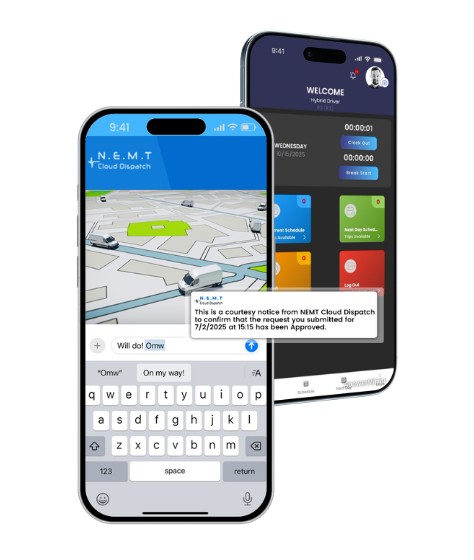
Real-time bus location on a live map
Parents open the app and see exactly where their child's bus is right now. The map updates continuously as the bus moves through the route. The bus icon shows direction of travel and current speed. Stop locations are marked along the route so parents see how far the bus is from their child's stop.
Accurate ETA at every stop
The app calculates estimated arrival times at every stop on the route based on actual bus position, route progress, and traffic conditions. ETAs update in real time as the bus moves — not as scheduled times that don't reflect what's actually happening. Parents know whether to send their child out the door now or in five minutes.
Push notifications for the moments that matter
Parents choose which notifications they want to receive. Common options include 'bus is X minutes away from your stop' (configurable distance), 'bus has arrived at your stop,' 'bus has arrived at school,' 'bus is delayed' (with reason), 'route change announced,' 'weather closure or delay,' and 'early dismissal scheduled.' Notifications respect quiet hours and parent preferences.
Direct messaging with the transportation office
Parents send messages to the district transportation office through the app instead of looking up phone numbers. The transportation office sees these messages in the dispatch console alongside everything else they're managing. Responses go back to the parent through the app. The whole conversation is logged for the district's records.
Stop-level information
Parents see the full route their child rides — stop sequence, scheduled times, and current ETAs. Substitute bus information, route changes, and stop changes are surfaced clearly so parents know what's different about today's run versus the normal schedule.
Multi-child households
Parents with multiple children see all their children's buses in one app. Each child's bus appears as a separate entry with its own map view, ETAs, and notifications. Parents don't switch accounts or apps to track different children.
Substitute driver and bus information
When a substitute driver or substitute bus is running a route, parents see this information in the app. The substitute bus's vehicle ID and the substitute driver's name (if district policy allows) are shown so parents can identify the right bus when it arrives.
Route change and announcement broadcasts
When the transportation office needs to communicate something — a route change for tomorrow, a weather delay, an early dismissal, a new bus stop being added — the announcement broadcasts to the affected parents through the app immediately.
What the district transportation team does
The parent app connects directly to the district's NEMT Cloud Dispatch installation. Bus locations come from the GPS data the district is already collecting. Route schedules and stop information come from the district's existing route configuration. The transportation team doesn't maintain a separate parent-facing system — the parent app is a window into the same data the dispatch team already manages.
Setup and rollout
New districts deploying the parent app go through a structured rollout. Account provisioning creates parent accounts based on the district’s student information system. Stop assignments link each student’s parent account to the right route and stop. Notification preferences default to a sensible baseline that parents can customize.
Ongoing administration
Day-to-day administration is light. New parent accounts are created when new students enroll. Account changes (custody changes, address moves, transferred students) flow through the same processes the district already runs. The transportation team’s daily work — dispatch, route management, exception handling — happens in the dispatch console as before.
Privacy and student data protection
The parent app respects FERPA and district student-data privacy policies. Parent accounts only see information about their own children. Stop locations, ETAs, and route details are scoped to the specific students each parent is authorized to track. Driver and substitute driver information visibility is configurable per district policy.
Part of NEMT Cloud Dispatch's school transportation suite
The parent app is one component of NEMT Cloud Dispatch's school transportation software. The platform handles route building, dispatch, driver mobile apps, fleet management, and reporting for school transportation operations. The parent app gives parents a window into the same system the transportation team is already running. The data is connected.
Districts evaluating school transportation software typically don't need to evaluate the parent app separately — it's included in the platform. Districts using a different transportation software platform can deploy the parent app standalone, but the value compounds significantly when the parent app and the underlying transportation system come from the same vendor and share live data.
Included with school transportation software
The parent app is included with NEMT Cloud Dispatch’s school transportation software at no additional per-parent fee. Districts pay for the platform based on vehicle capacity — the same per-vehicle pricing that applies to NEMT and paratransit operations. Parent accounts are unlimited.
This matters operationally because some parent app vendors charge per-parent or per-student fees that scale with district size. A 5,000-student district paying $1-3 per parent per month spends $5,000-15,000 monthly just on the parent app. NEMT Cloud Dispatch’s school transportation pricing includes the parent app in the platform fee, which means the cost doesn’t scale with district size.
Frequently Asked Questions
See the parent app in action
Book a demo and we'll walk through the parent app with the transportation workflow your district runs. We'll show what parents see, how the dispatch team manages parent communication, and how the app fits with your existing route operations. No sales pressure. Just a clear look at how a parent app changes the day-to-day for transportation directors.
Prefer to talk first? Call (623) 226-8966 or [email protected]


NEMT Cloud Dispatch is a featured product of Hybrid IT Services, Inc specifically designed and tailored according to the requirements of non-emergency medical transportation.
Copyrights © NEMT Cloud Dispatch, 2026 – All Rights Reserved. A product of Hybrid IT Services, Inc