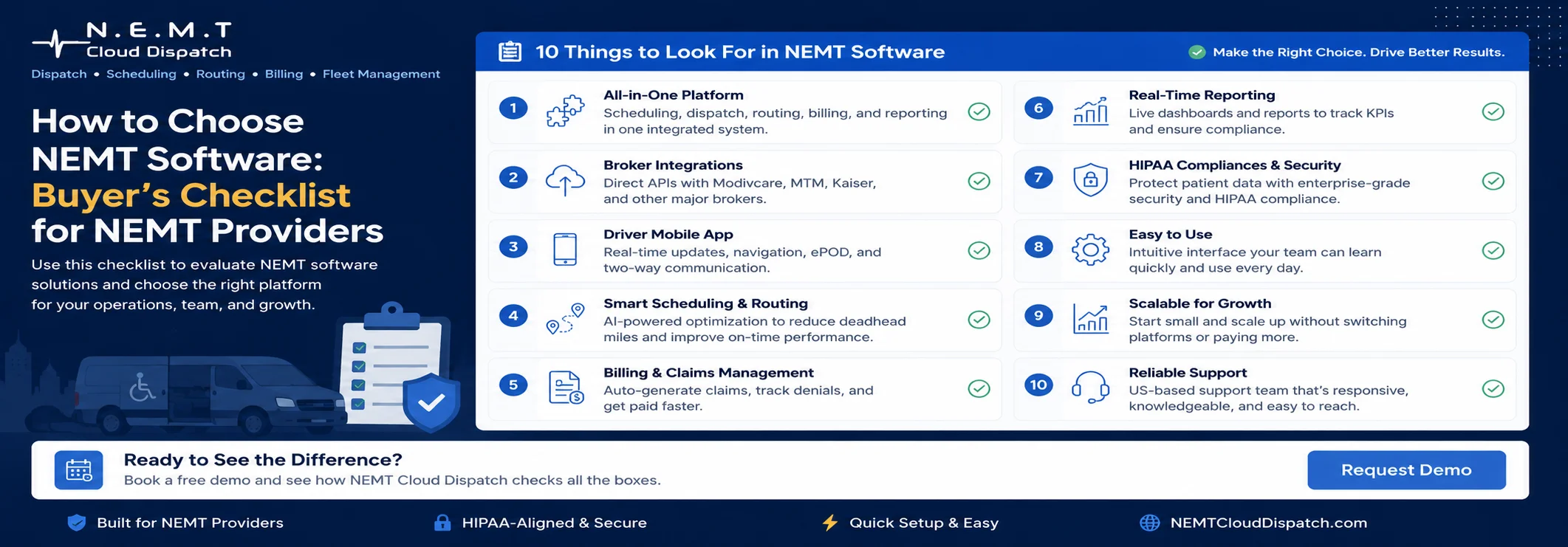
Choosing the right NEMT platform is not just a technology decision. It is a business decision that affects dispatchers, drivers, billing teams, brokers, patients, and your overall service quality.
If you are wondering how to choose NEMT software, start with one simple question: will this system make your daily operation easier, faster, and more accurate?
Many NEMT providers lose time because they depend on spreadsheets, phone calls, manual trip updates, disconnected billing records, and scattered broker information. These small problems quickly become bigger issues: missed trips, delayed payments, frustrated drivers, and unhappy passengers.
At NEMT Cloud Dispatch, we help transportation providers manage dispatching, routing, scheduling, fleet operations, billing, and broker support from one organized platform. This guide will help you compare vendors with confidence and choose software that fits your real workflow.
Quick Answer: What Should NEMT Providers Look For?
The best answer to how to choose NEMT software is to focus on daily operational value, not just a long feature list.
A good system should help you:
- Schedule one-time, recurring, and multi-leg trips
- Dispatch drivers faster
- Track trips and vehicle activity
- Improve routing and reduce empty miles
- Manage broker-related trip details
- Support billing and documentation
- Give managers clear reports
- Make driver communication easier
Use this NEMT software checklist before you attend demos or request pricing. It will help you compare platforms based on actual business needs instead of marketing claims.
Why the Right NEMT Platform Matters
NEMT is a detail-heavy business. Every trip may include appointment times, pickup windows, driver assignments, passenger mobility needs, vehicle type, broker requirements, trip notes, mileage, and proof of service.
Non-emergency medical transportation is an important service for Medicaid members who need help getting to and from medical appointments, according to the official CMS non-emergency medical transportation guidance.
If your software cannot manage these details clearly, your team ends up doing extra manual work. That creates delays, confusion, and billing problems.
The right platform gives your team one source of truth. Dispatchers know where drivers are. Drivers know what trip comes next. Billing teams can review completed trips more easily. Managers can see what is happening without asking for updates all day.
That is why this NEMT software buyer guide focuses on practical features that help providers run a better operation.
1. Start With Your Biggest Operational Problems
Before comparing vendors, write down your current challenges. This step is important because every provider has different needs.
Ask yourself:
- Are dispatchers spending too much time on phone calls?
- Are drivers missing trip updates?
- Are recurring trips hard to manage?
- Are billing records incomplete?
- Are broker trips difficult to track?
- Are routes inefficient?
- Are reports hard to generate?
Once you know your pain points, it becomes easier to understand how to choose NEMT software for your specific business.
For example, if your biggest issue is dispatch confusion, you need stronger NEMT dispatch software. If billing is your biggest challenge, you need cleaner trip documentation and reliable NEMT billing software. If your fleet is growing, you need better routing, driver management, and fleet management software.
2. Review Dispatching Capabilities
Dispatch is the center of every NEMT operation. If dispatchers do not have clear visibility, the entire service day becomes harder to manage.
Strong NEMT dispatch software features should help your team assign trips, monitor driver status, handle cancellations, manage no-shows, update routes, and respond to same-day changes.
Look for dispatch tools that include:
- Real-time trip visibility
- Driver assignment
- Pickup and drop-off status
- GPS tracking support
- Trip notes
- Cancellations and no-show tracking
- Route adjustment tools
- Driver communication
NEMT Cloud Dispatch gives providers a clear dispatch management workflow so teams can reduce confusion, respond faster, and manage more trips without relying on scattered calls and messages.
3. Check Scheduling Flexibility
NEMT scheduling is more complex than regular transportation scheduling. Providers often manage dialysis rides, therapy appointments, hospital discharges, wheelchair trips, ambulatory rides, recurring trips, and last-minute ride changes.
That is why NEMT scheduling software features should be one of your top priorities.
Your software should support:
- One-time trips
- Recurring rides
- Multi-leg trips
- Pickup windows
- Appointment times
- Passenger notes
- Mobility requirements
- Vehicle type selection
- Driver availability
Good scheduling helps prevent overbooking, missed details, and poor driver assignments. With NEMT scheduling software, providers can create and manage schedules more efficiently, so dispatchers can plan the day with more confidence.
4. Evaluate Routing and Fleet Management
Routing affects fuel costs, driver productivity, passenger experience, and on-time performance. A poor routing process can waste hours every week.
When evaluating NEMT software features, look for routing and fleet tools that help you:
- Assign the right vehicle to the right trip
- Reduce unnecessary mileage
- Track driver movement
- Manage vehicle availability
- Handle route changes
- Improve on-time performance
- Monitor trip progress
NEMT Cloud Dispatch supports routing and NEMT fleet management visibility so providers can make smarter decisions throughout the service day. This is especially useful for growing NEMT companies that need better control over drivers, vehicles, and trip volume.
5. Look at Billing and Broker Support
A trip is not truly complete until the billing and documentation are handled correctly. If your system does not organize trip data well, your billing team may spend extra time fixing errors or searching for missing details.
A strong platform should help you manage:
- Completed trip records
- Mileage information
- Pickup and drop-off details
- Driver updates
- Broker trip information
- Service notes
- Billing review
- Export-ready records
This is where the right NEMT software checklist becomes valuable. During a demo, ask the vendor to show how completed trip data moves from dispatch to billing.
NEMT Cloud Dispatch is built to support providers with dispatching, broker integration support, billing visibility, and trip documentation, helping teams reduce manual work and improve operational accuracy.
6. Test the Driver Experience
Drivers should not need a complicated app to complete daily work. If the driver tool is confusing, your office will receive more calls and your trip updates may become inconsistent.
The driver side should be simple, clear, and fast.
Look for:
- Easy trip list access
- Pickup and drop-off details
- Navigation support
- Passenger notes
- Status updates
- No-show documentation
- Signature or proof-of-service options where needed
A good driver experience improves communication between the road team and the office. This is another important part of how to choose NEMT software because even the best office system will fail if drivers do not use it properly.
7. Review Reporting and Business Visibility
You cannot improve what you cannot measure. Reporting helps owners and managers understand what is happening across the business.
Useful reports may include:
- Completed trips
- Canceled trips
- No-shows
- Driver performance
- Vehicle utilization
- Mileage trends
- Broker volume
- Billing status
- On-time performance
The best NEMT software features are not only about managing today’s trips. They should also help you understand long-term performance.
NEMT Cloud Dispatch gives providers better visibility into daily operations, helping managers make informed decisions instead of relying on guesswork.
8. Ask About Compliance, Security, and Data Protection
NEMT providers often handle sensitive passenger and trip information. Your software should support secure access, proper user permissions, and responsible data handling.
Ask vendors:
- Can user roles be controlled?
- Is sensitive information protected?
- Are backups available?
- Are activity logs included?
- Does the vendor understand NEMT workflows?
- Can records be reviewed when needed?
This part of the NEMT software buyer guide is important because security, documentation, and accountability affect trust and long-term business stability.
For privacy and security awareness, providers can review the official HHS HIPAA business associates guidance. For accessibility-related transportation information, the FTA ADA guidance is also a useful authority resource.
9. Compare Support and Onboarding
Software is only useful if your team knows how to use it. Before choosing a vendor, ask about onboarding and support.
Important questions include:
- How does setup work?
- Is team training included?
- Is support familiar with NEMT operations?
- Can dispatchers, billers, managers, and drivers be trained?
- What happens after launch?
- Is help available when your team needs it?
When providers ask how to choose NEMT software, support is often overlooked. But in real operations, strong support can make the difference between smooth adoption and daily frustration.
NEMT Cloud Dispatch focuses on helping providers use the platform practically, so teams can manage trips, dispatching, billing, broker support, and reporting with more confidence.
10. Do a Real Workflow Demo
Do not accept only a generic product tour. A demo should show how the software handles your real business scenarios.
Ask the vendor to demonstrate:
- A recurring dialysis trip
- A wheelchair ride
- A same-day cancellation
- A driver reassignment
- A broker trip update
- A no-show
- A billing review
- A route change
A real demo is one of the best ways to understand how to choose NEMT software because it shows whether the platform can handle your daily workflow, not just look good on screen.
Buyer’s Checklist Before You Choose
Use this NEMT software checklist before making a final decision:
- Define your top operational problems
- Review dispatching tools
- Check scheduling flexibility
- Test routing and fleet visibility
- Review billing support
- Ask about broker workflows
- Test the driver app
- Review reports
- Ask about onboarding
- Confirm security controls
- Compare total cost
- Request a real workflow demo
If a platform checks these boxes and feels easy for your team to use, it is much more likely to support your growth.
Conclusion
Now that you know how to choose NEMT software, focus on the platform that solves real operational problems. Do not choose software only because it has a long feature list. Choose the system that helps your dispatchers work faster, your drivers stay informed, your billing team reduce manual work, and your managers see the business clearly.
NEMT Cloud Dispatch is built for providers who want smarter dispatching, better scheduling, improved routing, stronger fleet visibility, easier billing workflows, and practical broker support.
If you are ready to run a more organized and efficient NEMT operation, Request a Demo with NEMT Cloud Dispatch today.
Frequently Asked Questions
What is the most important feature in NEMT software?
The most important feature is reliable dispatch visibility. Dispatching affects driver assignments, trip updates, route changes, cancellations, no-shows, and passenger experience.
Why are NEMT scheduling software features important?
NEMT scheduling software features are important because providers need to manage recurring rides, appointment times, pickup windows, mobility needs, and vehicle requirements without confusion.
Why do NEMT dispatch software features matter?
NEMT dispatch software features matter because dispatchers need real-time control over trips, drivers, cancellations, and route changes. Better dispatching helps improve service quality.
What should I ask during a software demo?
Ask the vendor to show your real workflow, including recurring rides, wheelchair trips, broker updates, no-shows, route changes, and billing review.
How does NEMT Cloud Dispatch help providers?
NEMT Cloud Dispatch helps providers manage dispatching, scheduling, routing, fleet management, billing, broker support, reporting, and driver communication from one organized system.